May 19th, 2026

Hi everyone,
This update is a large one with many changes and features to cover.
Starting with the most visible changes: Support for multiple Plex servers at once, media version selection on play, Global State Restoration, enhancements for Plex's native Android TV recommendations, the ability to add any Android TV media to your Watch Next row, a new browsing style for Android TV rows in the home tab, extra image transition options while browsing, and a new UI for viewing a cast member / person’s media
Additionally, there have been a huge number of code changes involved in further pushing Dispatches' rendering performance, reducing RAM usage even further than previous efforts, and cutting down on the app's boot time from a cold start. These changes actually compromise the bulk of the effort made since the last update, even if there isn't much else to say about them beyond the following:
Users should expect smoother performance while using the app, quicker start times when the app is starting cold, and further reduced RAM usage throughout.
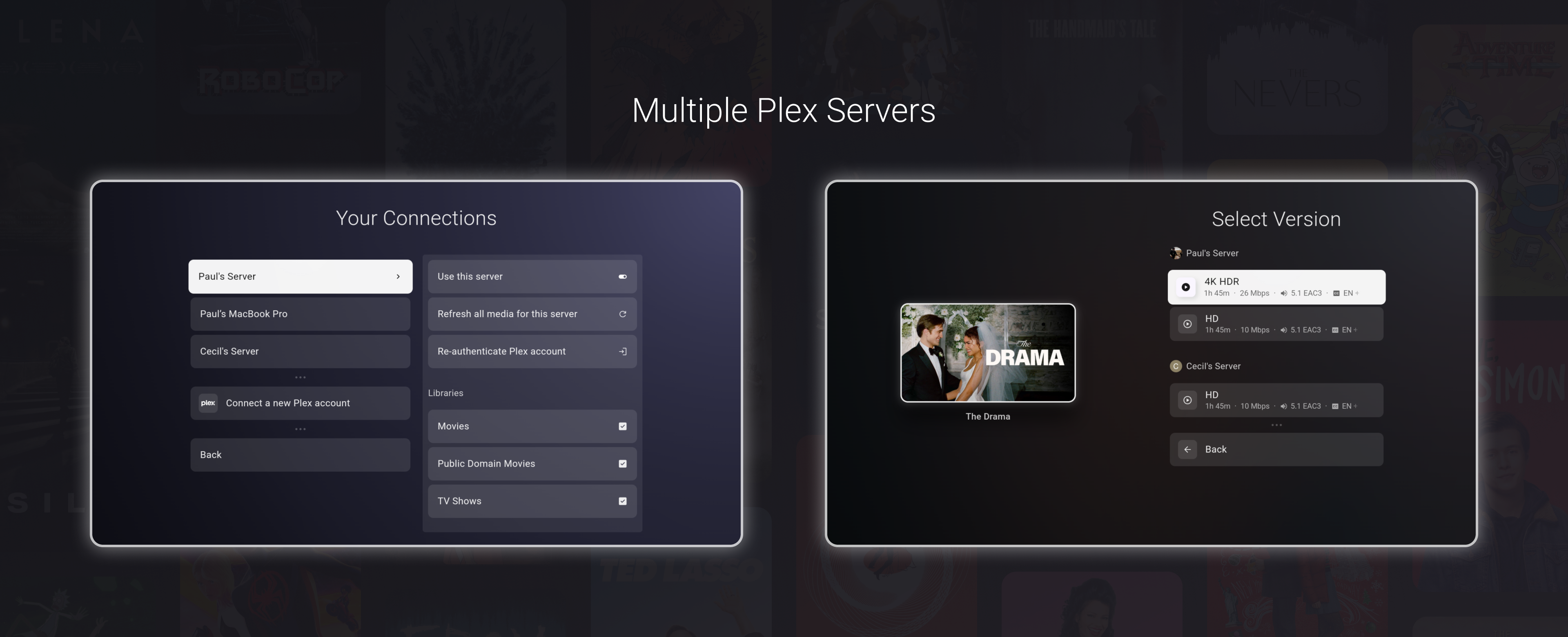
Dispatch now supports connecting to and enabling multiple Plex servers.
This means you can connect more than one Plex account, enable multiple servers, and assign the desired server/user combinations to each Dispatch profile.
A few things this enables:
Multiple Plex servers can now be enabled at the same time.
Connecting a new Plex account is additive and no longer replaces your existing server setup.
Dispatch profiles can be made up of any mix of users from all enabled servers, all while keeping the watch next, watchlist, and recommendations merged into one UI together
Users may also choose to create separate Dispatch profiles per server, turning the profile selector into more of a server selector
The option (on by default)
Cross-server version selection on play, allowing users to select and play a release for a media across all servers
Playback and media actions now understand the selected server/version instead of acting on a collapsed item blindly.
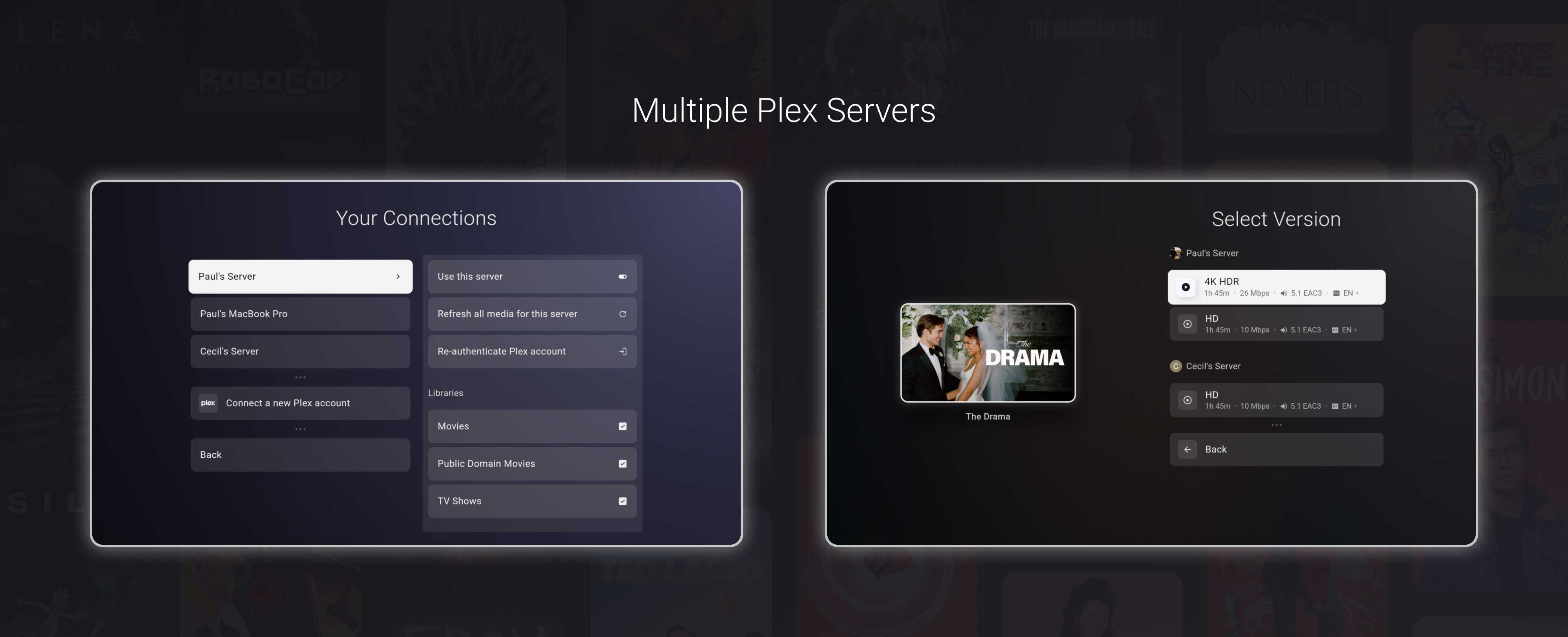
By default, media are grouped by their TMDB ID, so that if 5 versions of a movie exist across 5 enabled servers, you don't see 5 copies. This option also collapses the same media within a server into one.
When you select play on a collapsed media, the version selector will show all options across all servers.
This options can be toggled from Settings -> Experience -> Collapse Common Media
Dispatch now has a media version selector.
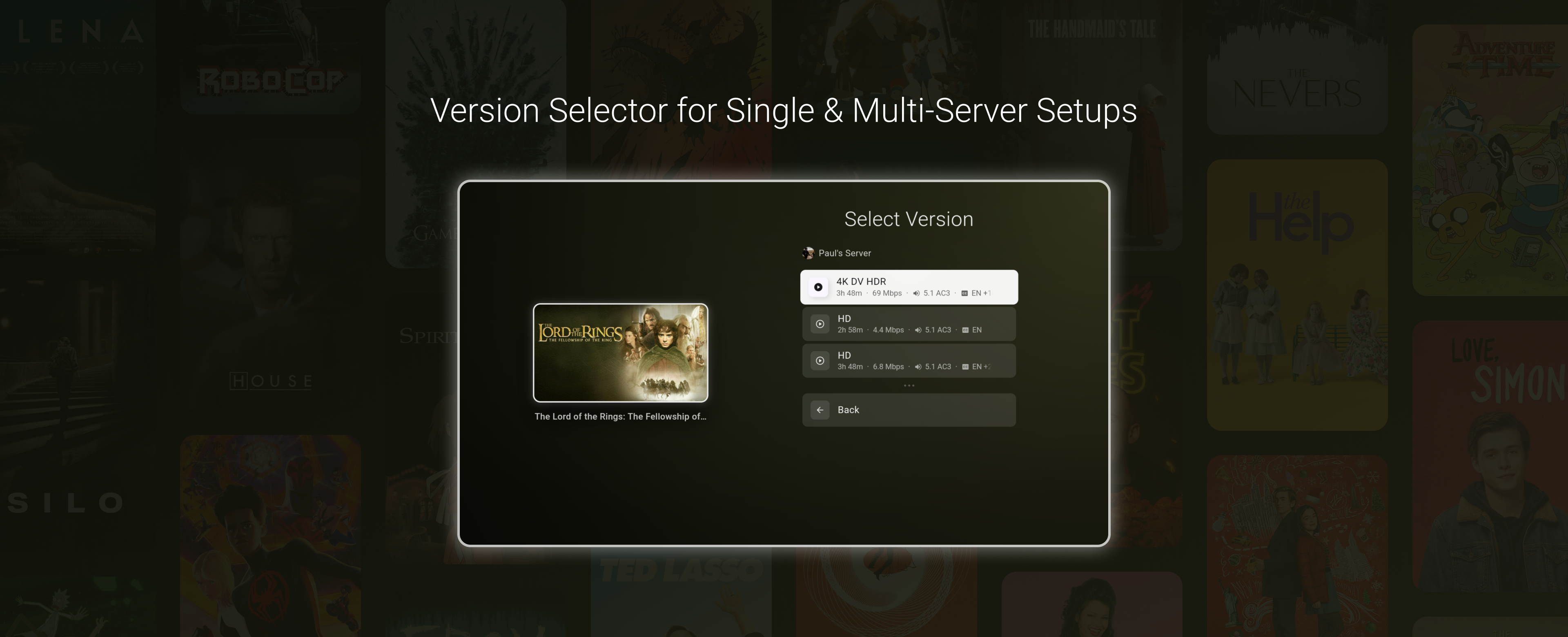
When a movie or episode has more than one playable option, Dispatch will show a version selection screen before playback. This applies both to media with multiple versions on the same Plex server and media that exists across more than one enabled Plex server.
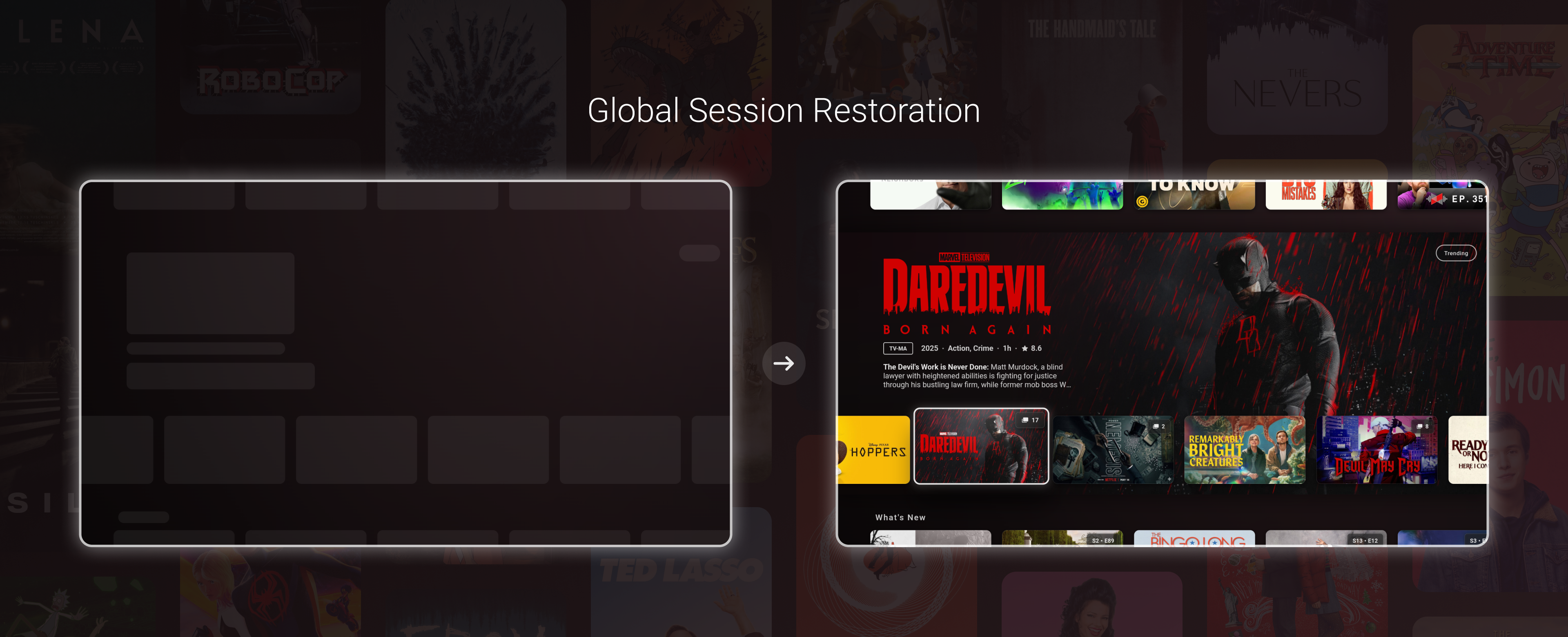
Session restoration in Dispatch is the ability to restore the prior UI state after a full shutdown. The previous beta release came with its own rendering performance improvements that essentially broke this feature since the last release.
However, the old state restoration system was always very limited (it only ever applied to the home page) and planned for a rewrite anyway. This has now been completed.
With the newly written restoration system, Dispatch can now restore your exact focus and browsing scenario after being closed down. The idea is that if you start playing media or using a different app on a device with a lower amount of RAM, there's always a chance the OS will kill the app while it's in the background. With this feature, you will be able to continue browsing exactly where you left off even if Dispatch has to start up from scratch.
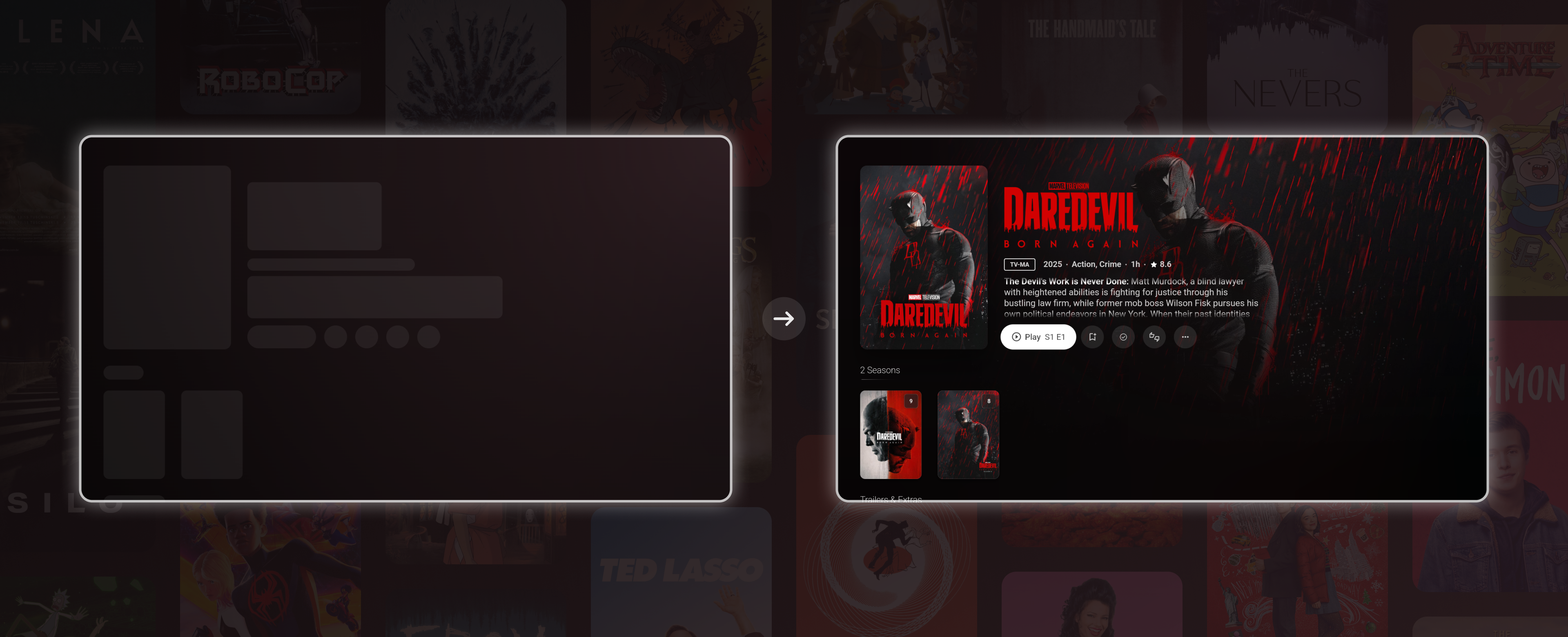
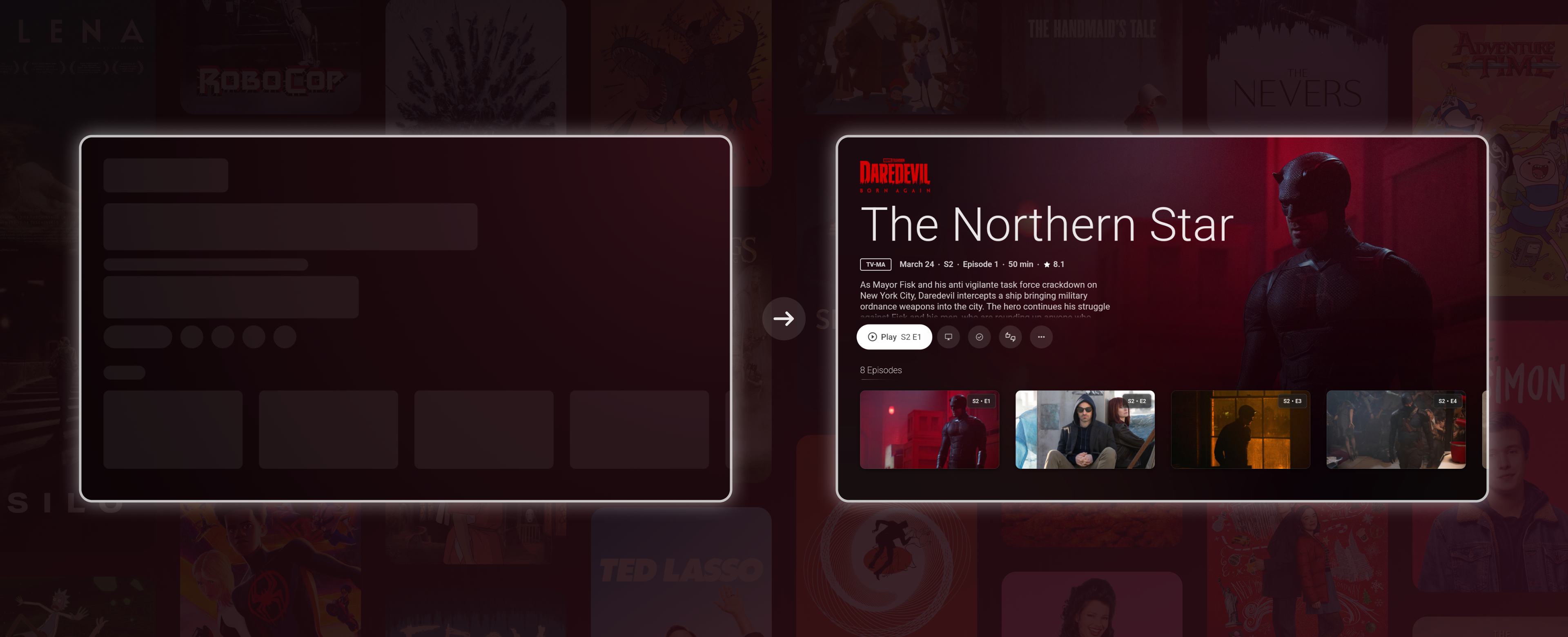
For example, if you browse through the home page, find a movie, open the director's profile, select one of the movies from their catalogue, select another person's media, open a result from their page, and then play that item, Dispatch will be able to restore that exact UI focus and page change should the app be killed while the movie is being played.
You could also be on the last movie of a 10,000-length movie library, and the session would still be restored.
This feature can be toggled on and off from Settings → Experience → Save & restore state
Here is a video of the state being restored and then backed out of multiple routes, every page restored:
This also includes a novel "auto-skeleton" feature that automatically generates the skeleton UI on session save, which will be used during the restoration phase on the next app start. If you've ever been annoyed by loading skeletons that don't EXACTLY match their incoming content, well then you're a little like me, I guess. The goal of all of this is to lead to, hopefully, more seamless and consistent browsing experiences for all devices.
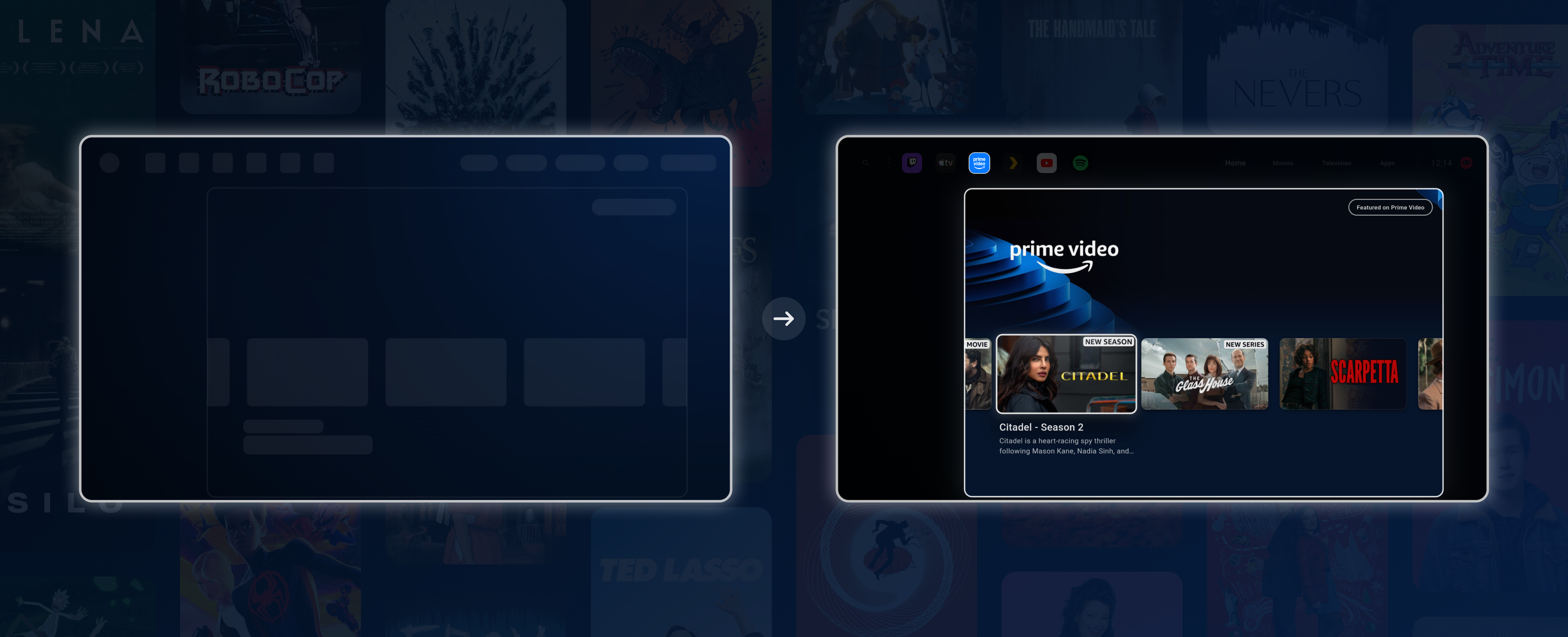
Plex media that appears through Android TV recommendations is now supplemented with metadata from your connected server. These are NOT recommendations made through Dispatch's direct integration with Plex, but rather recommendations surfaced by the installed Plex app on your device. Previously, these would show bare metadata and low-res artwork, as that's all the Plex app provided.
So if you use the recommendations surfaced by the Plex app itself, those rows should now feel much closer to normal Dispatch media. (I’m not sure how common this is but I’ve been made aware that it is part of some people’s preferred setups.)
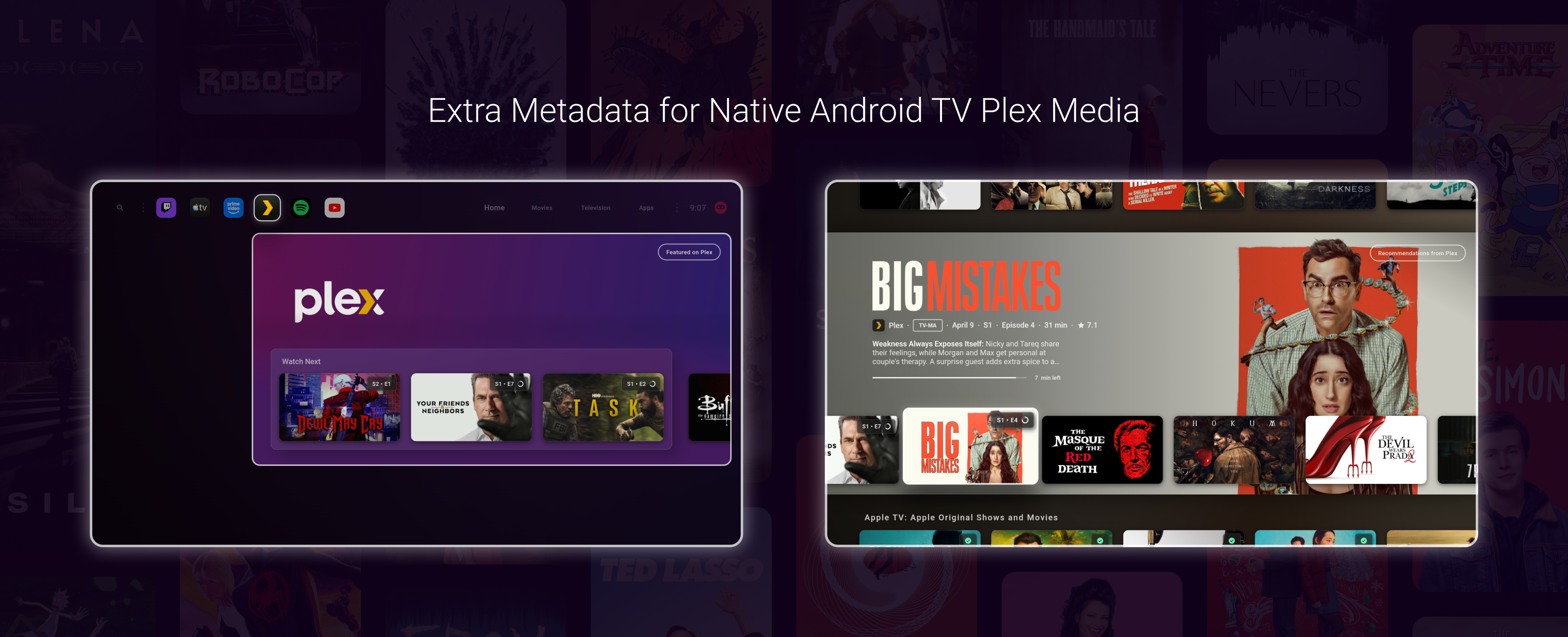
This makes Plex items from Android TV rows feel more like regular Dispatch media instead of generic Android TV recommendation entries.
You can now add any Android TV media to Dispatch's Watch Next row.
This means any recommendations you see from YouTube, Apple TV, or whatever other app recommendations are on your device can be saved for later viewing. Items added show up in your Watch Next row alongside your other media.
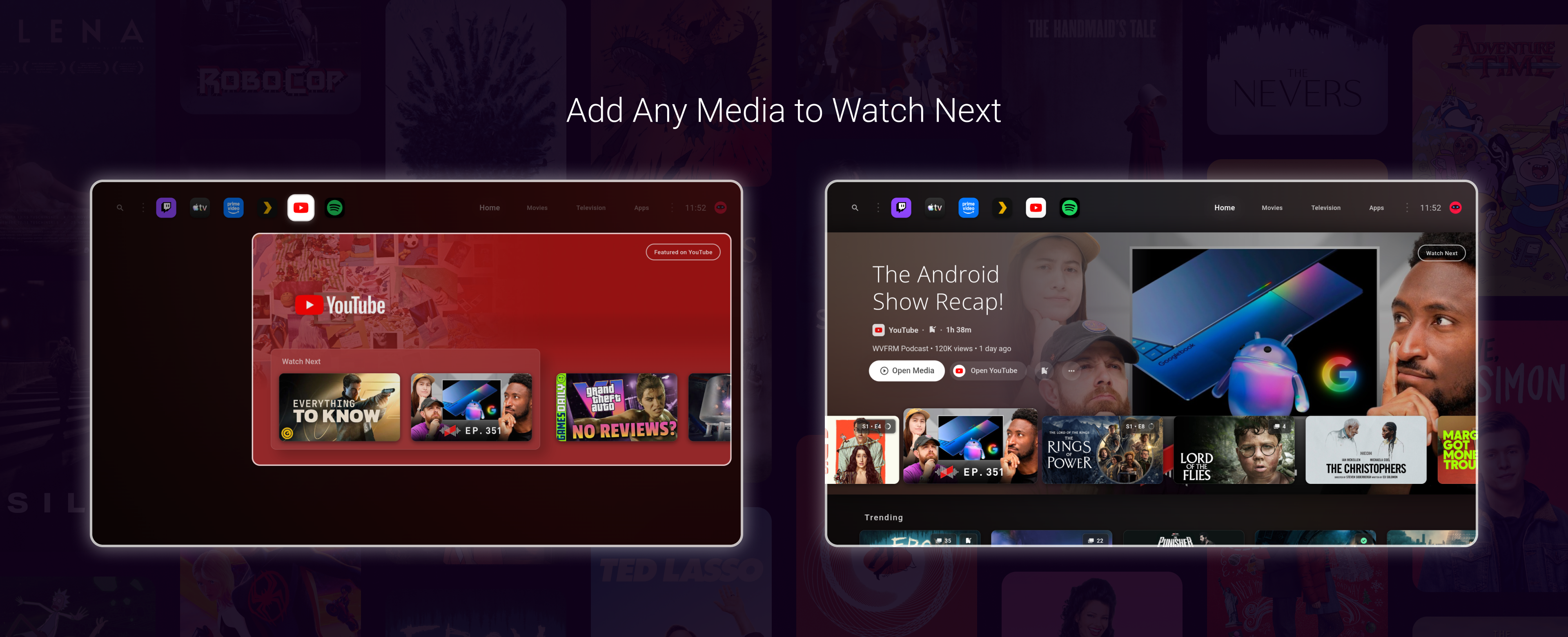
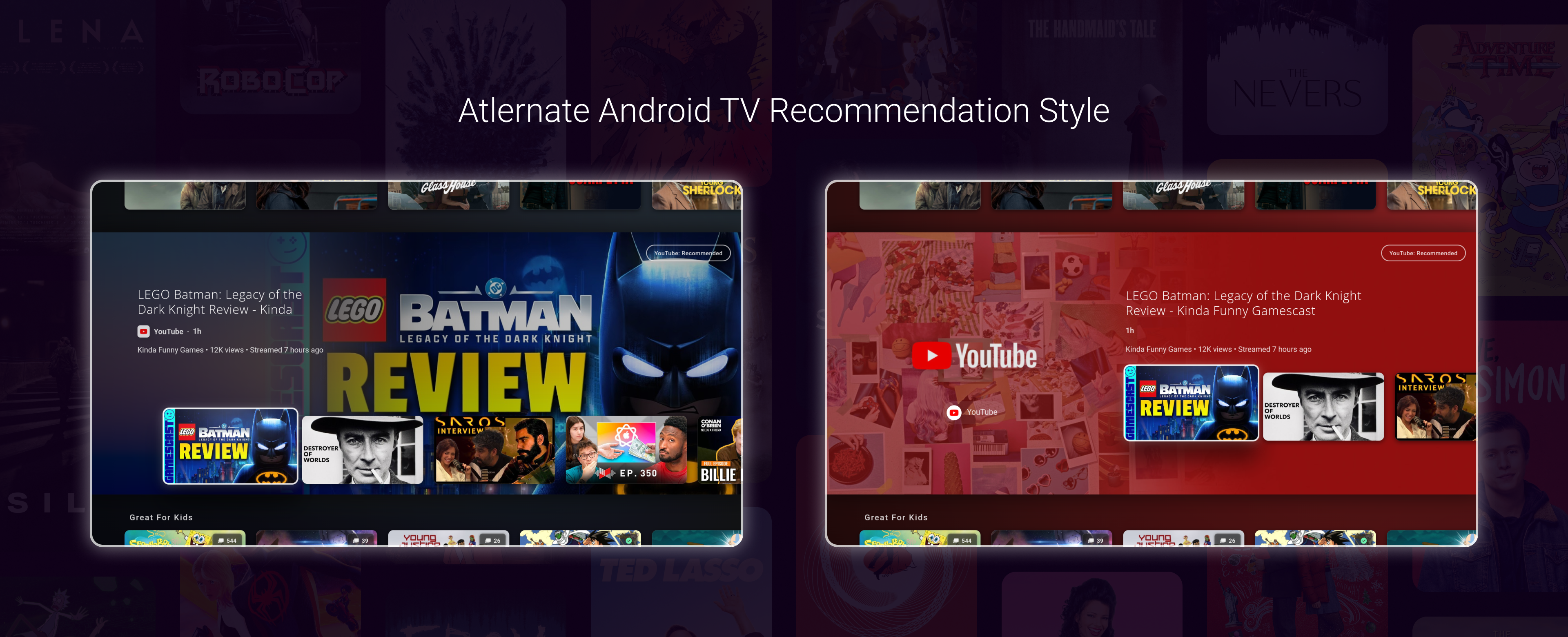
This update also adds an alternate presentation style for Android TV recommendation rows.
With this option toggled, you can choose between Android TV rows that match the style completely of the normal Plex media rows or continue using the "Collected" UI, which uses a common app banner for those rows.

There are now more options for how Dispatch transitions between media images.
The available modes now include the default behaviour, blink-style transitions, crossfade, and slide. The new modes are a little experimental for now, but they will be stabilized shortly. You may notice some random minor glitches with the slide mode in particular.
Here's two small videos with the slide mode enabled:
The synchronization system for Android TV media has been completely re-written. Android TV media should sync now with far fewer (hopefully none) issues, as well as much more quickly than before.
However, since this is a full rewrite, some unexpected bugs may still occur or crop back up. Please let me know of any current issues you have with the new release, if any are present. Once whatever edge cases for the new system are ironed out, I don't believe there will be any issues regarding syncing ATV media going forward. It's my goal to get any and all remaining quirks in the new system ironed out as quickly as possible, so I'll appreciate any feedback on the new system testers can give.
Plex sync has also been optimized with many changes and fixes. The same applies as above: Synchronization should be much faster, but some edge cases may occur that still need to be completely ironed out.
As previously stated, this update includes a lot of performance work across startup, focus restoration, rendering, media transitions, image loading, and app list handling.
A lot of the rendering and memory improvements are due to some heavy rendering engine customizations, which were not trivial at all. However, if all goes well, it should only translate to smoother performance for all devices.
Some weird visual glitches may occur that still need to be resolved. If any are noticed, let me know.
This release should once and for all fix an issue where users could have their onboarding status wiped, leading to repeated onboarding prompts. I've never personally experienced this issue; however, I know it's been a long-standing annoyance for some users.
The largest priority now for me is getting all beta changes pushed to the stable release. I'm aware the stable release, at this stage, lacks many of the features of the beta branch. I understand that this may be frustrating to some users, so I will be working very hard to stabilize any remaining beta-only issues and get these features to the bulk of Dispatch users in the next 2-3 weeks.
Work for Jellyfin support is already underway, with Stremio support to follow soon after.
I’m also prioritizing multilingual support as well now.
It’s my goal and expectation that, going forward, updates will be coming at a faster rate across both beta and stable channels. The multi-profile support and multi-server support both constituted large rewrites of core parts of the app. Now that they are feature complete, the road ahead for future integrations, features, and improvements is far smoother than behind.
Thanks!
December 12th, 2025
New
Hi Everyone! This update brings quite a few features and changes to cover.
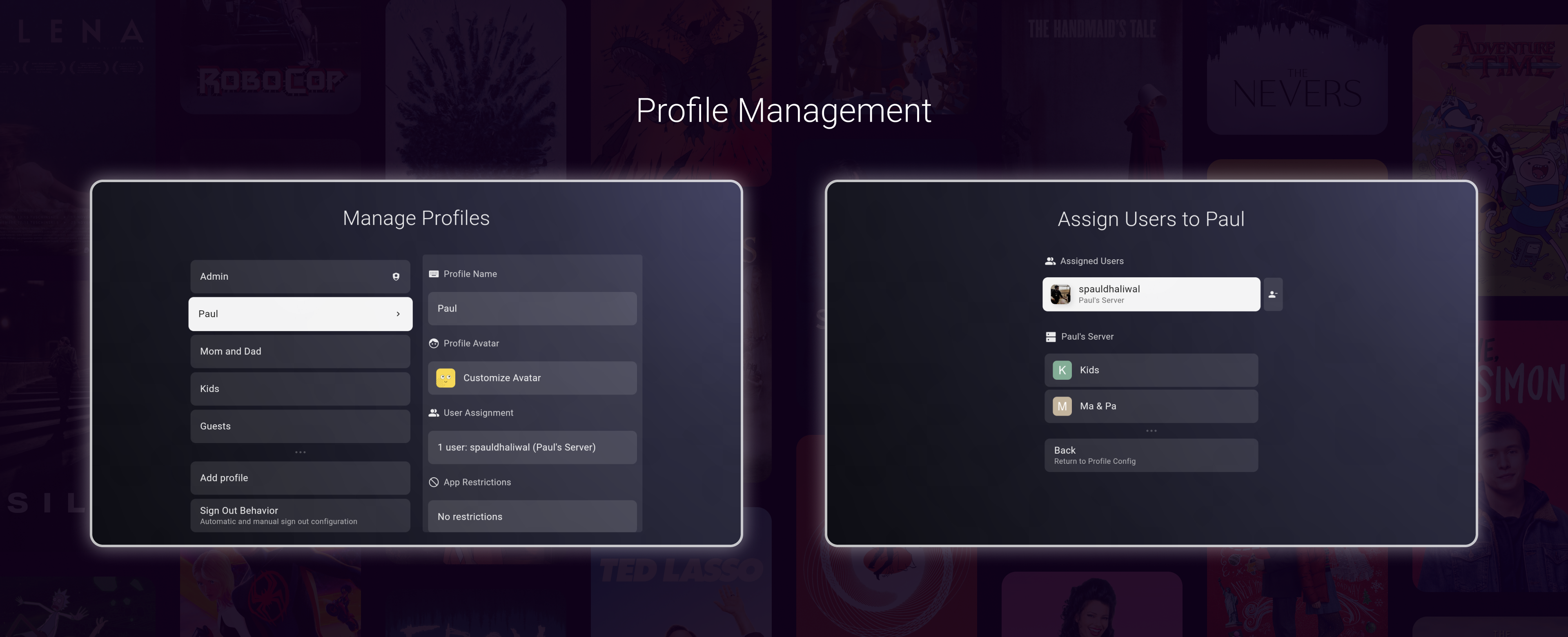
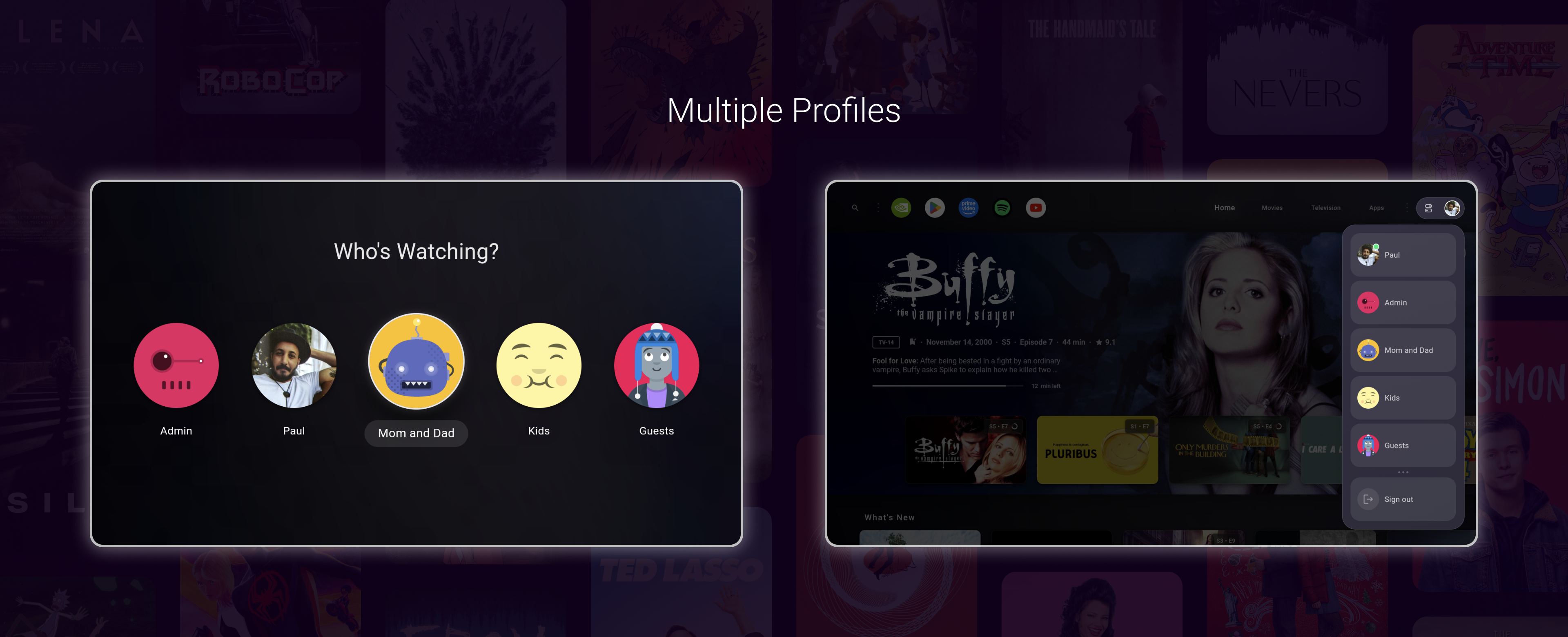
Dispatch now supports multiple profiles, allowing you to create personalized experiences for everyone in your household.

Most existing personalization options are now profile-specific. This means each profile can have its own favorite apps, feed customizations, wallpaper, and other preferences — all independent of one another.
Here's what else is included with profiles:
Create profiles and assign one or more Plex users
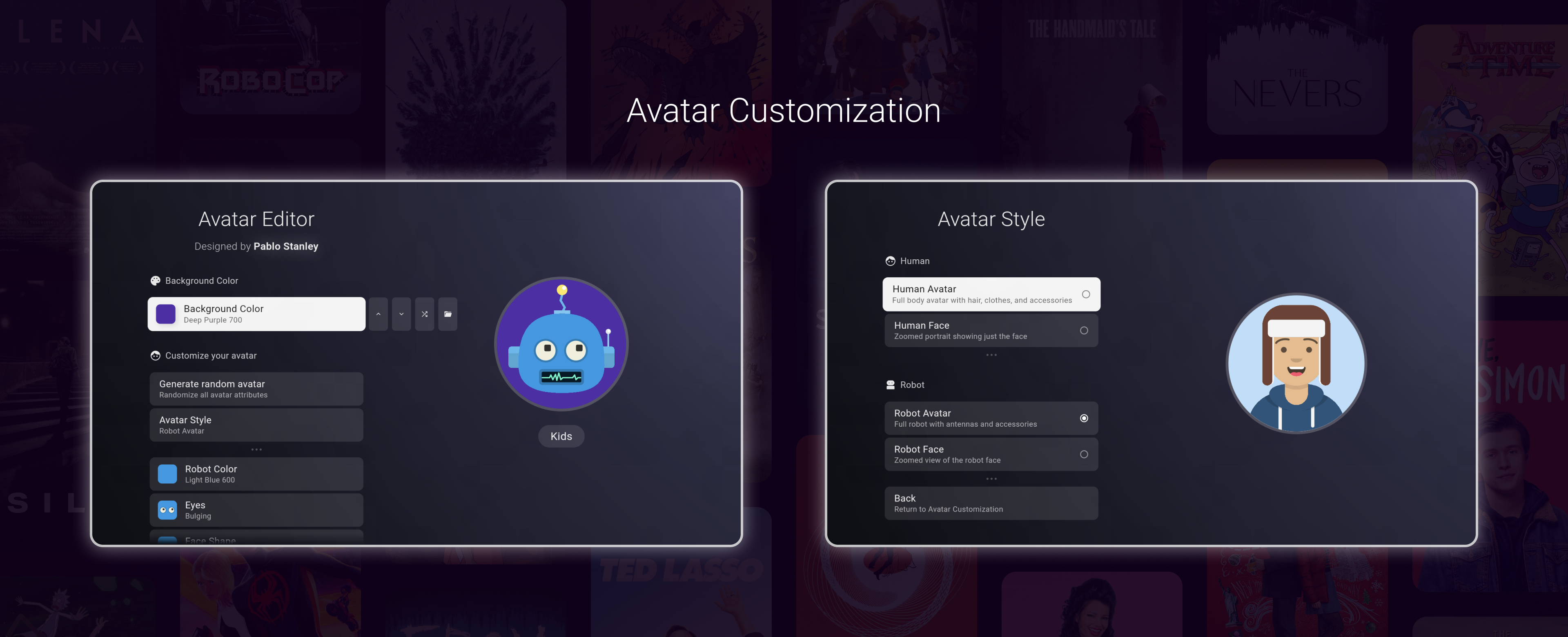
Customize avatars
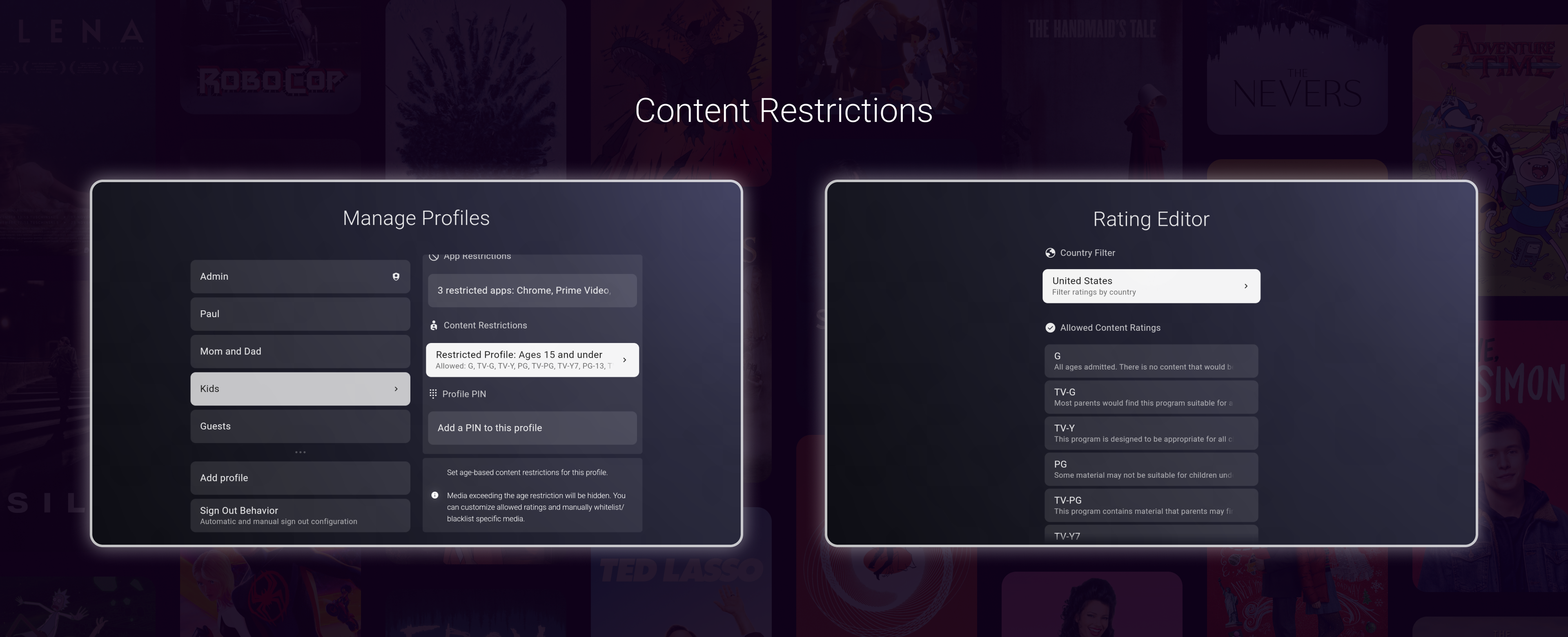
Set app and content restrictions per profile
PIN protection and profile locking
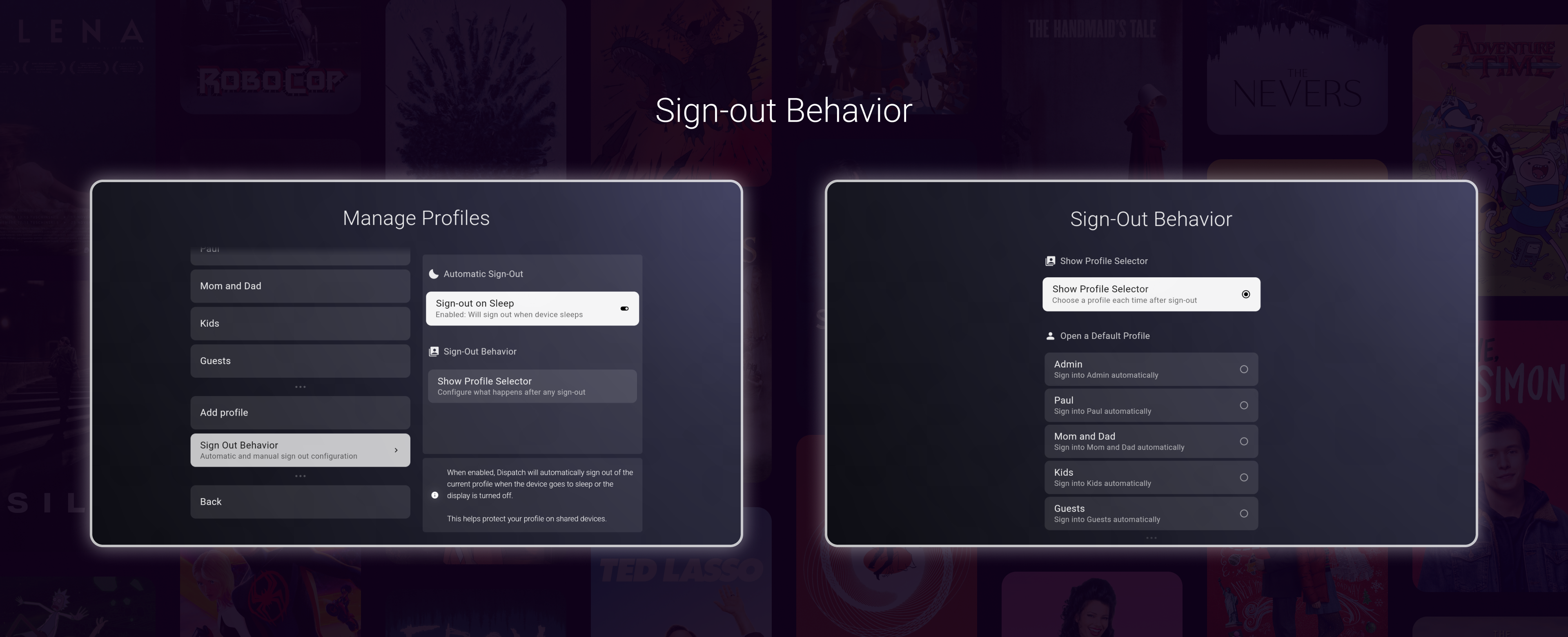
Configurable sign-out behavior (not a profile specific setting)
You can create any number of profiles. Once you create a profile, you may assign one or more Plex users to that profile.

Note: the Admin profile cannot be deleted as it is in charge of content and app restrictions.
When multiple users are assigned to a profile, your libraries, Watch Next list, and other media recommendations will be merged and displayed together.

You can customize your profile's avatar in a few different ways:
Create / generate a human or robot avatar in the Avatar Editor
Select a Plex user's account image
Select an image from your device
In terms of using the Avatar Editor, you can mix and match parts, styles, and colors to customize your profile's avatar to your liking.
A special thanks to Pablo Stanley for the original designs.

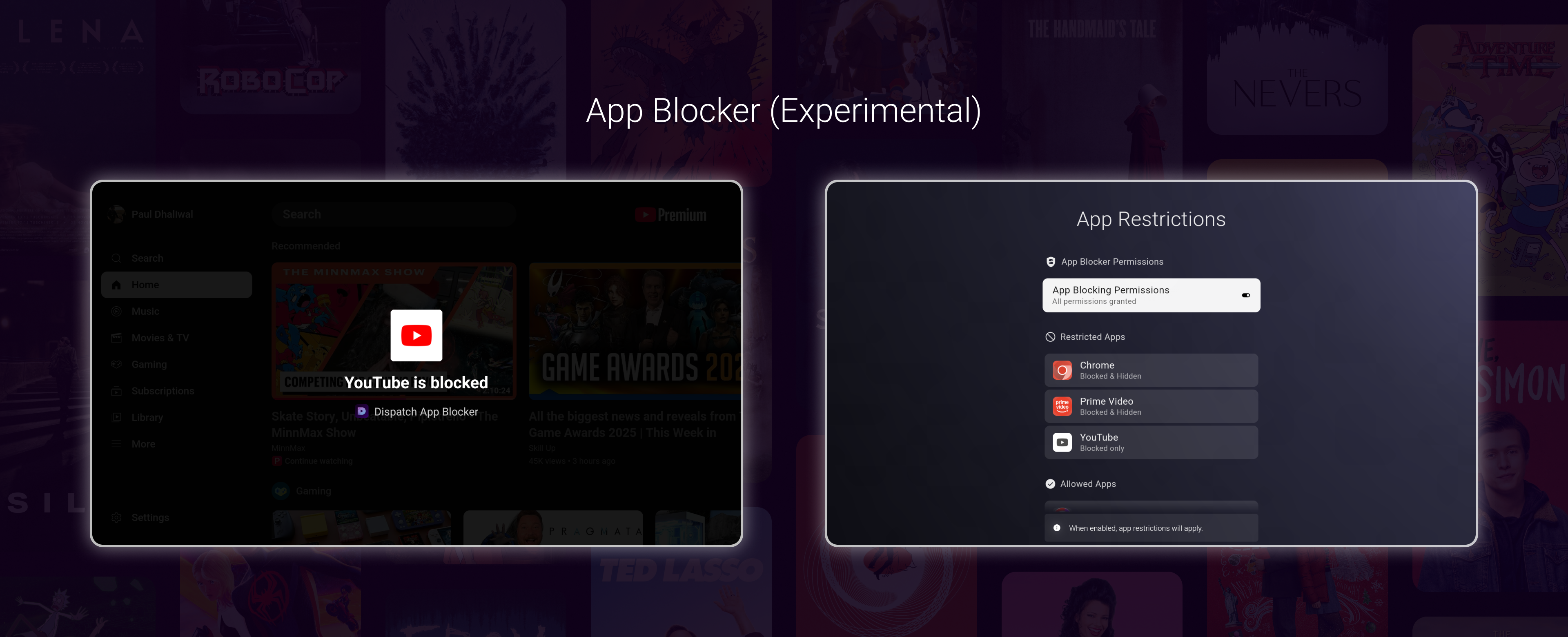
Dispatch now has the ability to hide apps as well as block apps with the experimental app blocker. Like the video player (discussed later), this feature is in early development and will likely have issues. That being said, it has been working reliably for me thus far.
To use App Blocking, you must enable the required permissions from Settings → Advanced → Permissions.
Like most options in Dispatch, app hiding and blocking is profile specific. When a user attempts to open a blocked app, an overlay will be displayed briefly before the user is returned to Dispatch.
Only the Admin profile can modify app restrictions.
Some additional notes about these features:
App blocking is managed by the Admin profile.
When all profiles are logged out of Dispatch, app blocking operates with maximum strictness. That means, when logged out, Dispatch blocks the combined set of all apps blocked across all profiles.
You may block the settings app on any profile except the admin profile
You have the ability to either hide an app from the UI, block an app from being accessed, or both.
A very important note about app blocking: Users should be careful when using this feature. It is technically possible to lock yourself out of your device, if it is not used with care, under these scenarios:
If you PIN lock the admin profile, AND block the settings app on the other profiles, AND THEN forget your pin, you will have locked yourself out.
If you PIN lock the admin profile, AND block the settings app on even one profile, log out of all profiles, thus causing the app blocker to operate with maximum strictness, AND THEN forget your PIN, you will have locked yourself out.

Profiles can have content restrictions applied to them. While it's true your Plex server already supports content restrictions, this allows you to set an additional layer of restrictions on a profile if you'd like.
Because of the complex nature of different content rating systems worldwide, the way this feature works is as follows:
By default, no restrictions are applied to a profile. This means that the profile follows exactly whatever media is made available by Plex to the user(s) assigned to this profile.
Applying restrictions works by age group. First, select an age group from the main Content Restrictions page (e.g., "14 and under"). Once selected, Dispatch blocks all content ratings above this threshold from all countries by default. For more granular control, you can use the Rating Editor to block or unblock specific ratings on a per-country basis.
Content restrictions work via a simple evaluation of whatever rating is in the rating column for that media. This value is controlled by the Plex server, and, if the rating in that column does not exactly match whatever is in Dispatch, it will be ignored. That means that simple spelling differences will cause ratings to be ignored. If you notice any of this during your usage, please let me know. It may not be possible to always have the most accurate and up-to-date collection of content ratings for all countries and media set-ups
Please note as well: content restrictions do not apply to media suggested by other android TV apps, such as YouTube, Netflix, etc… it only applies to your Plex media.
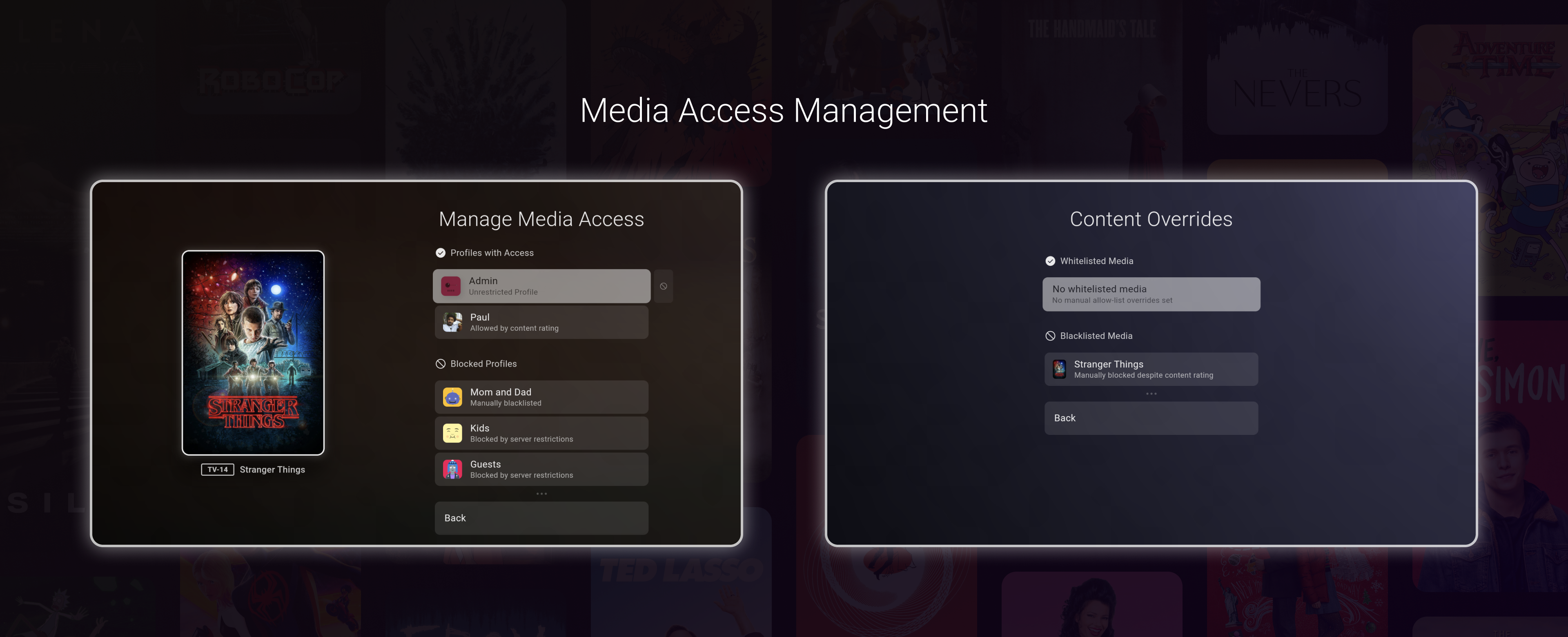
The administrator has the ability to whitelist or blacklist a piece of media for a content restricted profile. Please note that if your media server restricts access to a piece of media on the server level, Dispatch does not ever override it. Only media blocked via Dispatch's Content Restrictions layer is affected by this feature.

This feature can be accessed via the context menu for a piece of media, which is opened by long pressing the select button, or pressing the 3 dots on a highlighted media.
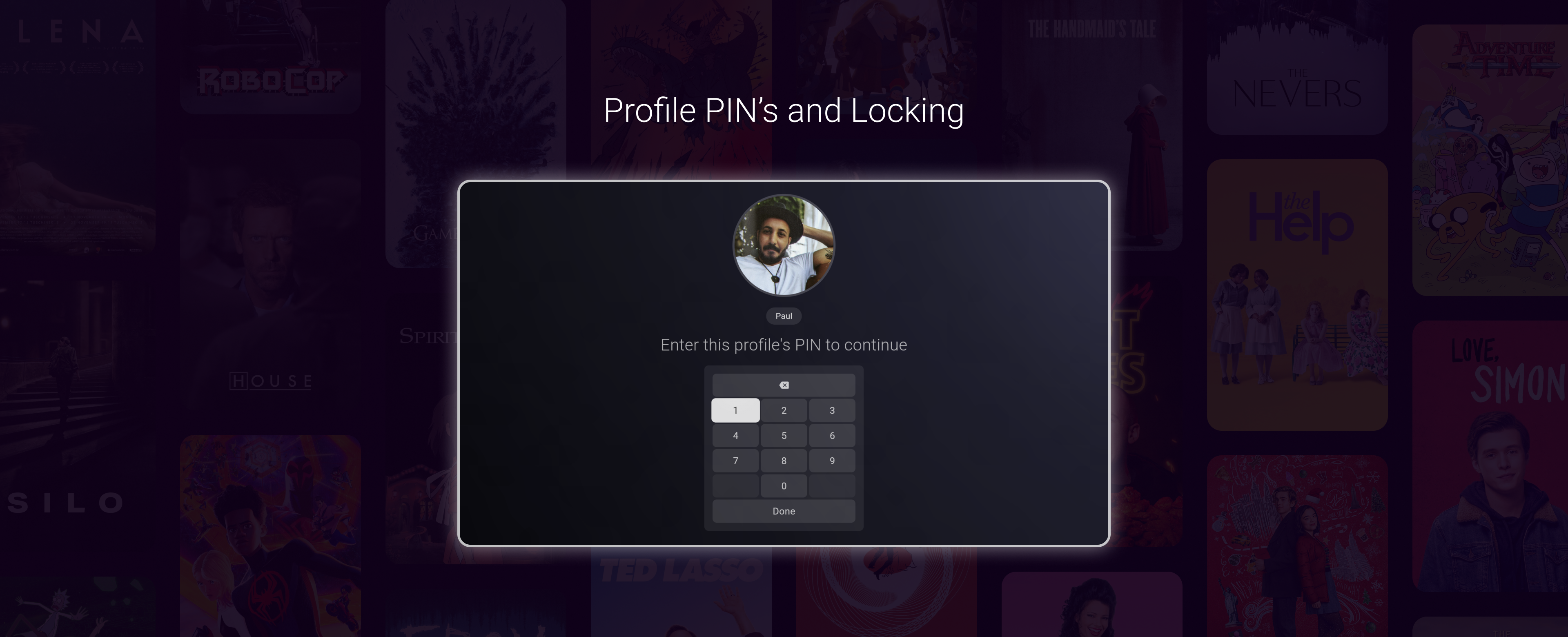
You can add a PIN to a profile, thus requiring the user to enter their PIN before switching to their profile. In addition, the administrator may lock profiles, which stops further customizations of that profile until unlocked.

You can choose to have Dispatch sign out of the current user when the device sleeps or the screen is turned off.

You can also choose whether "signing out" in Dispatch returns to the Profile Selector, or always signs back into a "default" profile. For example, you may wish for Dispatch to automatically sign out on sleep and return to a Guest or Public profile, instead of the lock screen / profile selector.

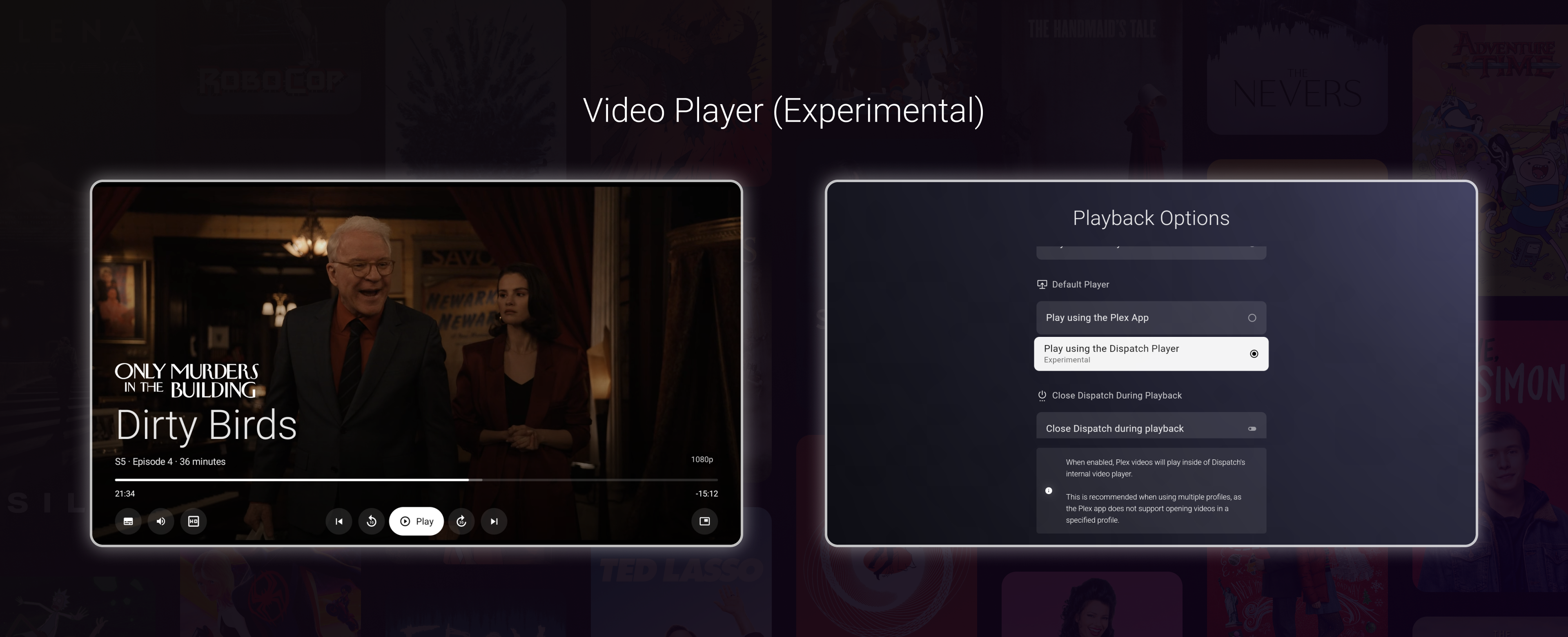
Dispatch now includes a video player. This feature is early and experimental, but can be enabled in the Settings → Experience → Playback Options.
The goal of this video player is to, over time, match the Plex app's player in terms of functionality, while addressing these issues:
Supports multiple profiles
Now that Dispatch supports multiple profiles, it's understandable that most users would expect that being on profile A would play media AS profile A. Unfortunately, the official Plex app does not support playing media as a specific user. Plex will simply play as whichever user was last logged into the Plex app on your device.
Dispatch's player does not have this limitation. If you enable using the new player, selecting media from the app will always play that media as that user, or users.
Supports multi-user profilesDispatch allows you to assign multiple users to a single profile. When you do this, the media shown inside the app will be a combination of accessible media by all users assigned to that profile.
Additionally, when you play media using Dispatch's internal player, playback progress will be updated for all users assigned to that profile. This will allow special use cases such as:
Combining users across servers
Today Dispatch only supports Plex, but, in the future, support will be added for Jellyfin as well as other media servers. Multi-user support will allow Dispatch to combine, and track playback progress, for the same media across multiple servers.
Combining users on the same server
Multi-user support can enable a "paired" profile set up. For example, perhaps you often watch media with your partner, and want the media you watch together to be tracked on both your Plex accounts, you can use a paired profile. Then later, when you are watching media solo, you can switch to your exclusive profile which only tracks media for you.
Properly track playback progress when opening media from Disaptch
There's been a long standing issue with the official Plex app where opening a media externally (aka launching media from the home screen) stops the Plex app from properly reporting playback progress to the Plex server. This is not unique to Dispatch, even the default launcher on Android TV has this issue. With the internal Dispatch player, this is problem does not occur.
There are likely other use cases I haven't considered. Either way, the flexibility is there.
Other notes on the video player
As previously mentioned, the player is in early development. I currently use it as my main player and have had minimal (usually zero) issues playing my content. However, I expect as more users with varying media types, and on different devices, test the player, more issues will be uncovered.
Also, while there's a PIP button in the video player controls, it is mostly non-functional. It was a last minute addition to the release that was only exposed to satisfy some issues with the Google Play submission.
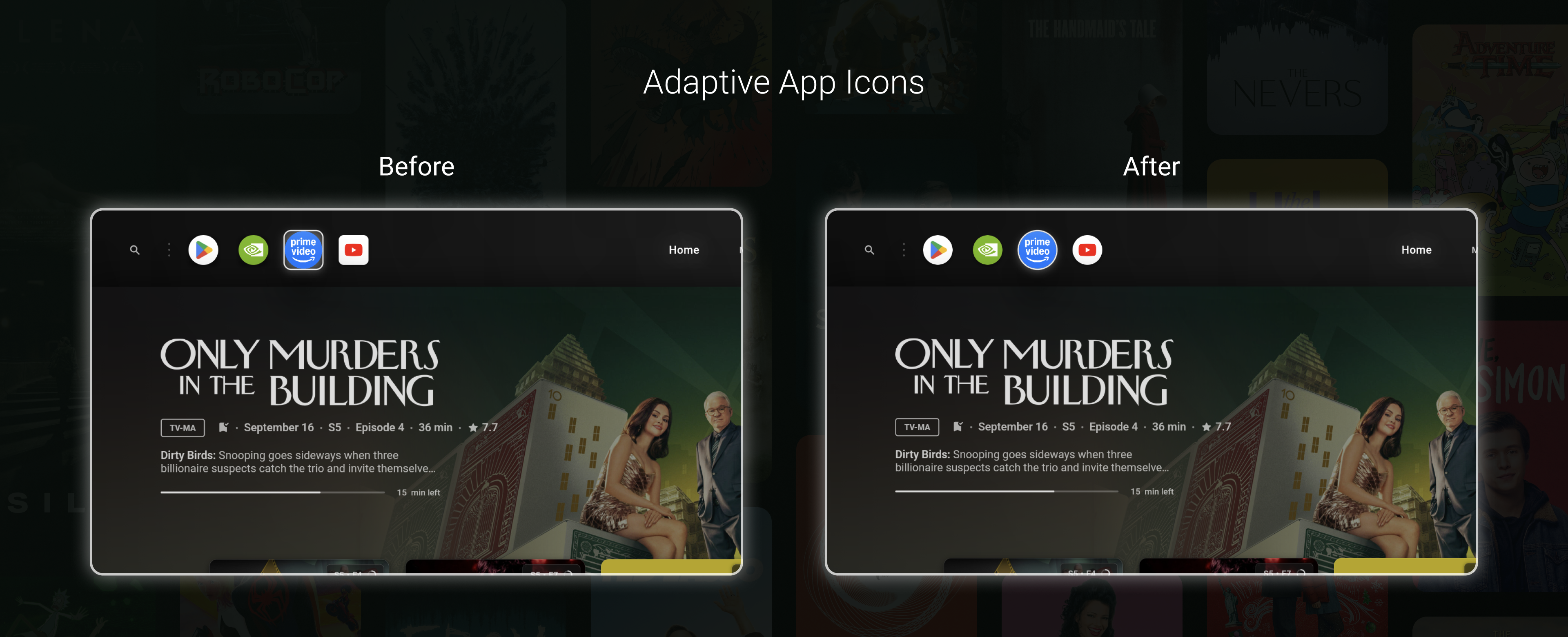
Dispatch now supports Android's adaptive icons for devices that require it. This means that if a device forces a certain shape of launcher icon, Dispatch will respect it. Most Android TV devices aren't affected by this, but it can occur.

Dispatch now has ~50% less peak RAM usage as well as a ~50% smaller APK & base installation size.
The following features are next on the roadmap
Multi-server support
Settings backup and restore
Language localizations
Jellyfin support
And one last note on the two experimental features in this release: these will make their way into the stable branch while they are still experimental. They will, of course, remain turned off by default.
Thanks!
September 15th, 2025
New
Hi everyone! This update brings all features from the beta branch into the stable branch. Most of these changes have already been covered in previous changelogs for the beta branch, so this mostly serve as a summary
Note that for the stable branch, the update will be rolled out gradually over the next few days.
First, I'll start with what's new for both branches
App start-up performance improvementsLarge performance improvements have been made to how Dispatch starts up. Users can expect the app to start much quicker than before, as well as be much smoother during those first moments after launch.
Movie / TV Browsing performance improvementsPerformance improvements have also been made to the movie and TV browsing pages. These are the pages you see when selecting "open x media" from the home page or library tabs. Browsing through movie trailers, cast members, as well as browsing TV shows and episodes is much smoother than in previous beta releases.
Extra Details page is now accessible from the home pageLike in the browsing pages, you can now highlight the plot of a media item and access the "extra" media details page.
Toggle YouTube trailers, teasers and behind the scenes videosUsers can disable / enable extras from YouTube from the Settings -> Experience page.
Generic performance improvements and UI fixes
*Everything below is a summary of features added to previous beta releases that are now in the stable branch.
First, here's a walkthrough video of the features discussed in this post:
-
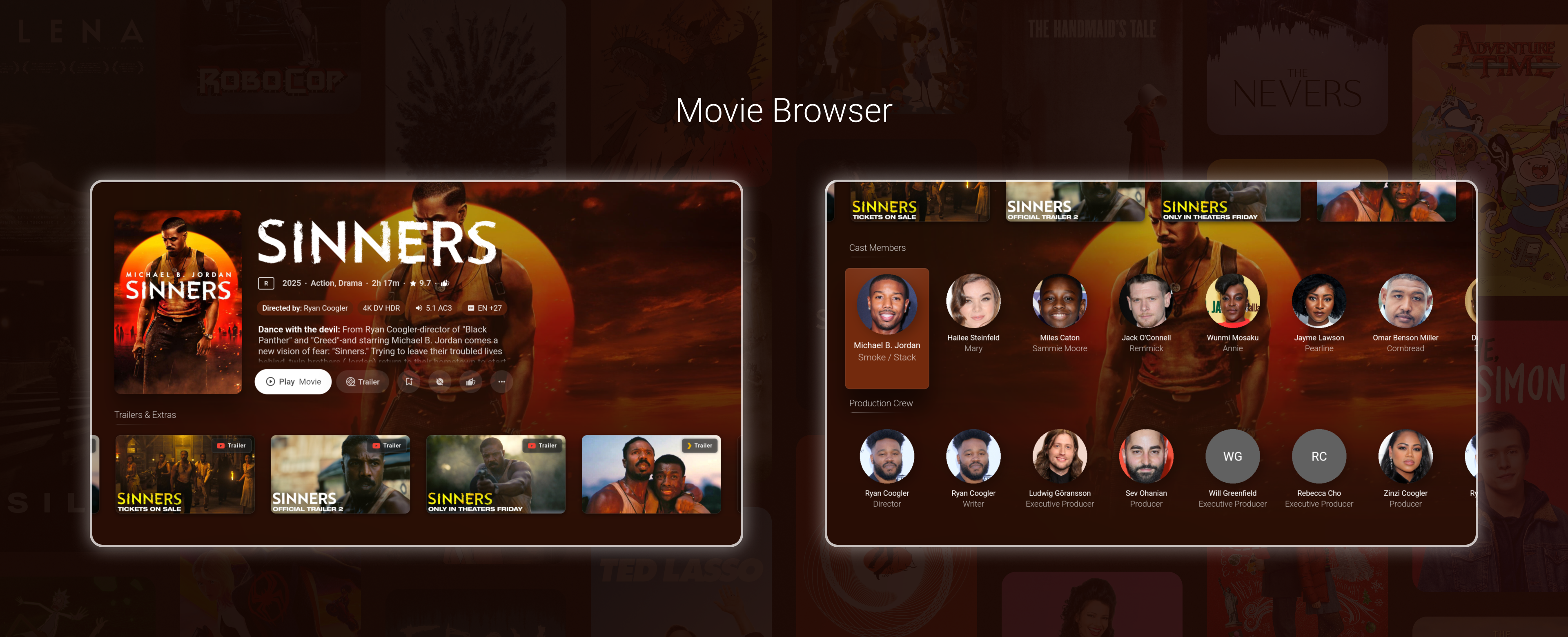
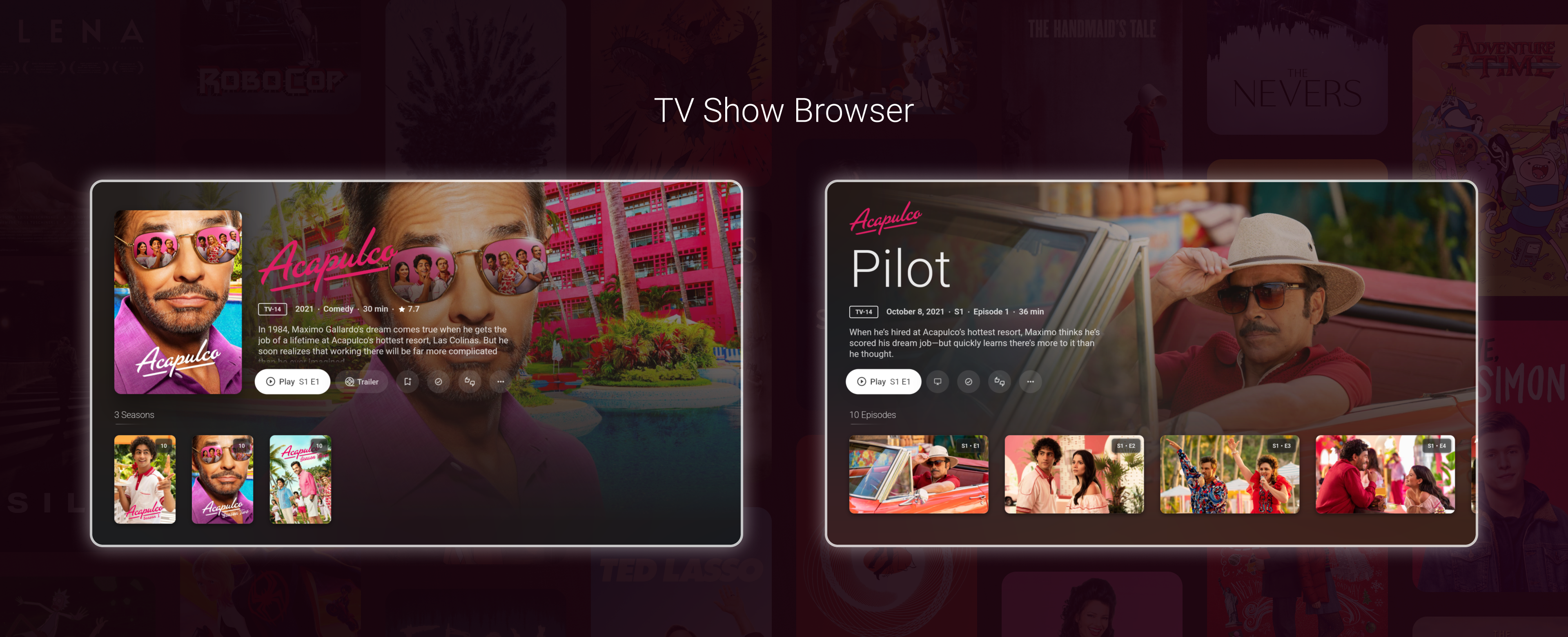
With this release, the "info" button/action now navigates to a detailed view of the selected media directly in Dispatch, rather than in Plex. In many places, you will now see actions such as "Open Movie" or "Browse TV Show" instead of the previously generic "info" button.

Users will see trailers, teasers, featurettes, and scenes from both Plex and YouTube, powered by TMDB.
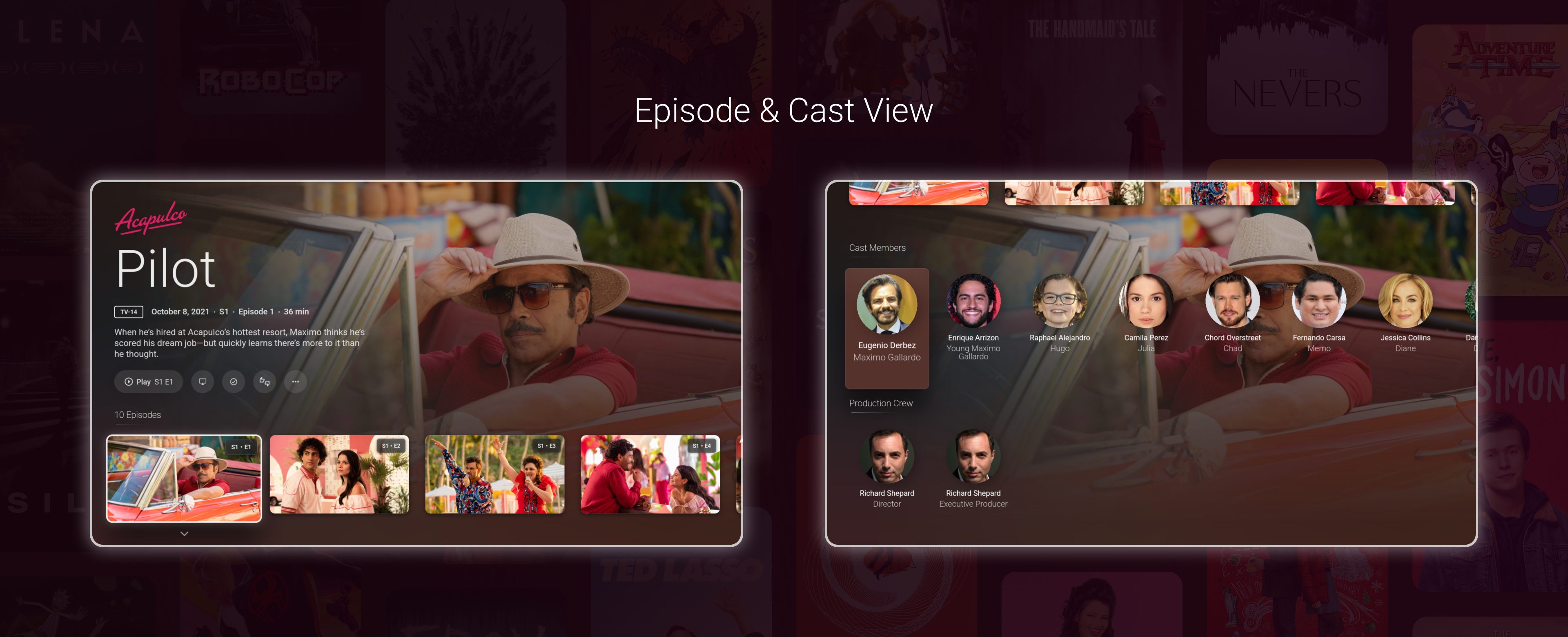
The movie's cast and crew are also browsable from this page. Selecting a cast / crew member will display all Plex media for this person.

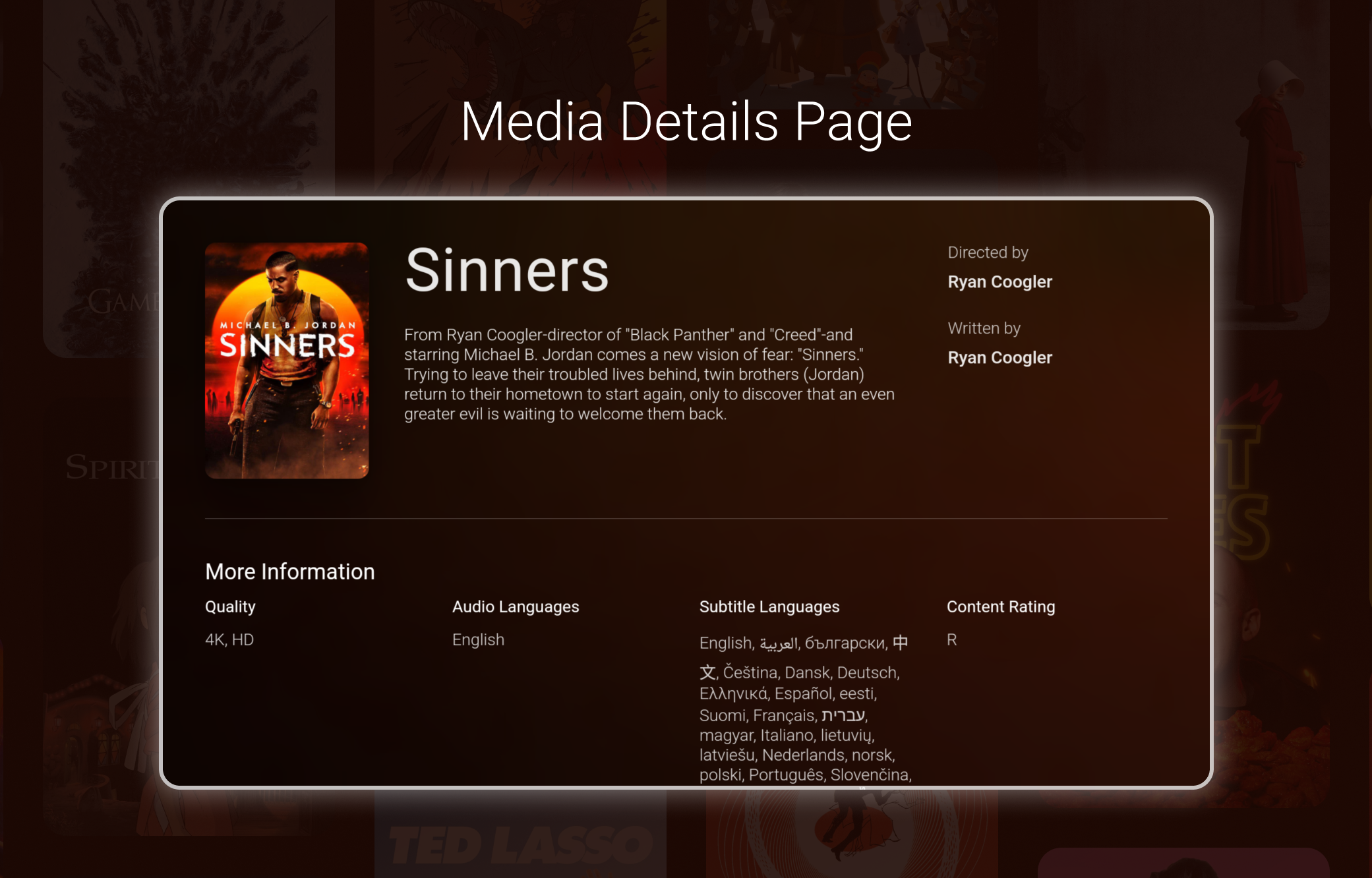
From the main buttons on the movie page, users can now navigate upwards to highlight the movie's plot. Clicking on this will display some more details for this item. Users can scroll up and down in this page using the directional buttons on their remote.

Users can also browse TV Shows. In addition to the cast and trailers found in the movie page, a TV show's seasons are also displayed here. When a season is selected, the episode browser is shown.

Users can browse all episodes in a season and select which one to play, same as in Plex. By pressing down while an episode is highlighted, the user will be presented with that episode's cast and crew. Cast and crew for episodes are loaded once an episode is highlighted. Once the down arrow appears under the episode thumbnail, the cast is available for browsing.

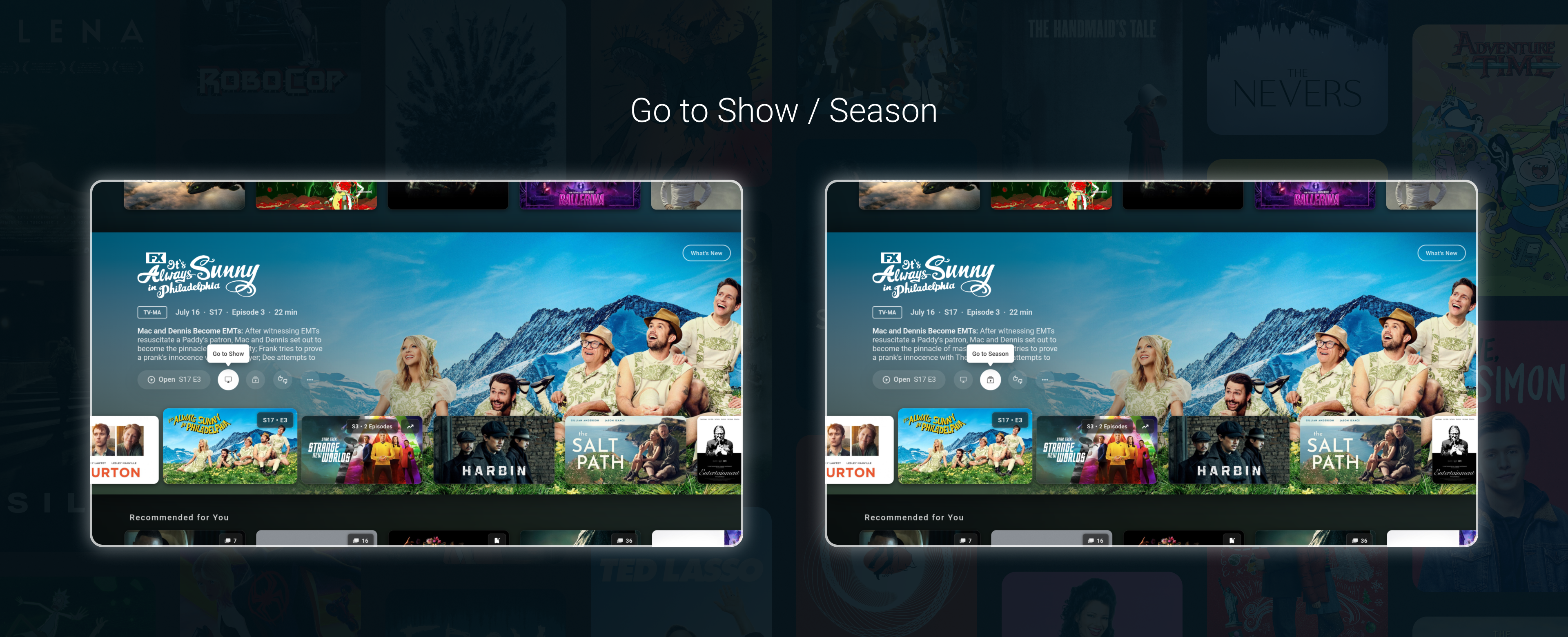
These two buttons are now available from the home page when viewing a TV Episode or Season, giving a convenient way to navigate through your shows. These are also available from the context menu by long clicking an item.

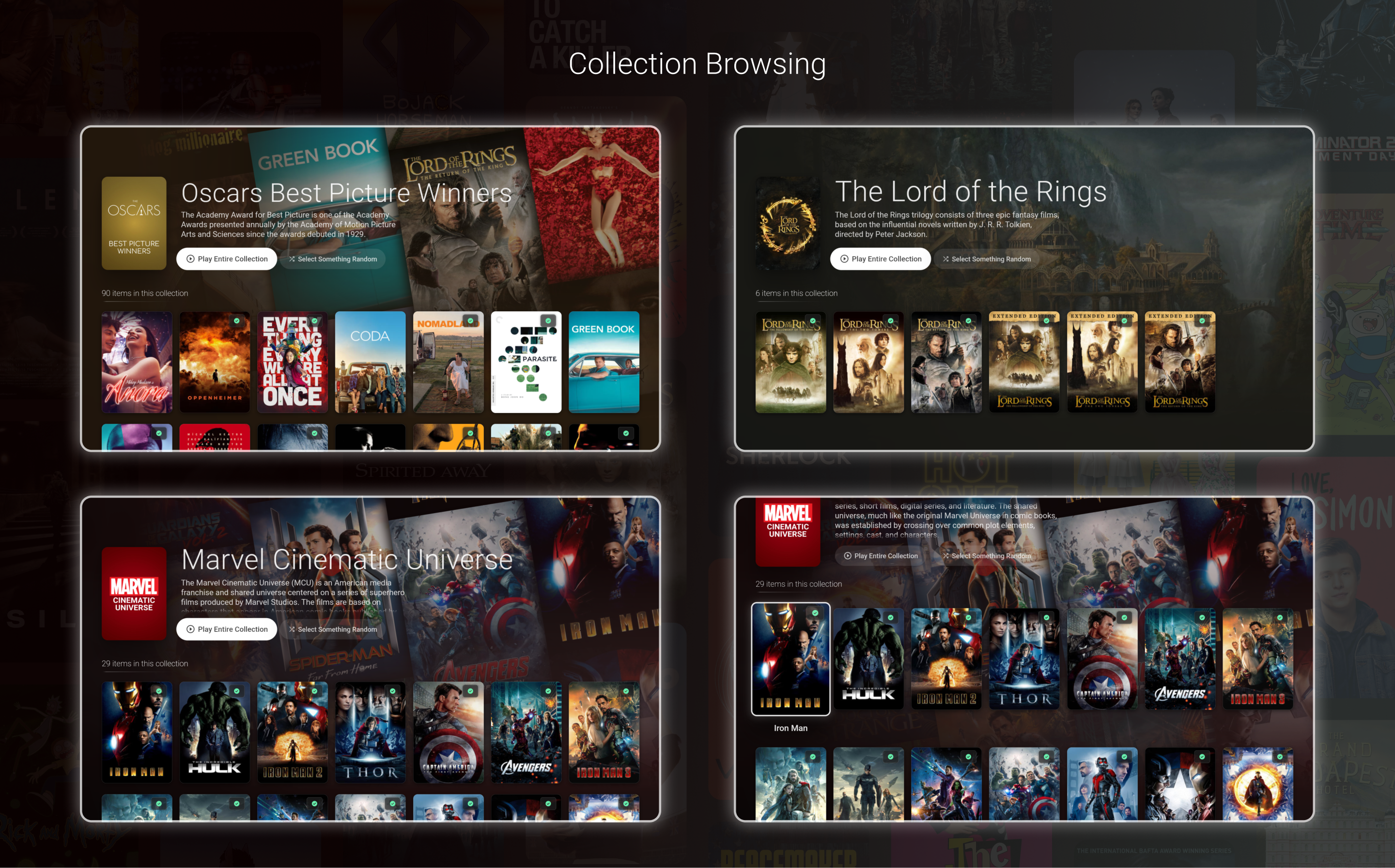
Users can now browse their collections as well. If a collection is missing a background image, a composite image is generated using random posters from the collection.
In addition, users can use the "Select Something Random" button to randomly bring up the detailed view for a random item in the collection. This can be a fun way of picking out a movie or show from a large collection.
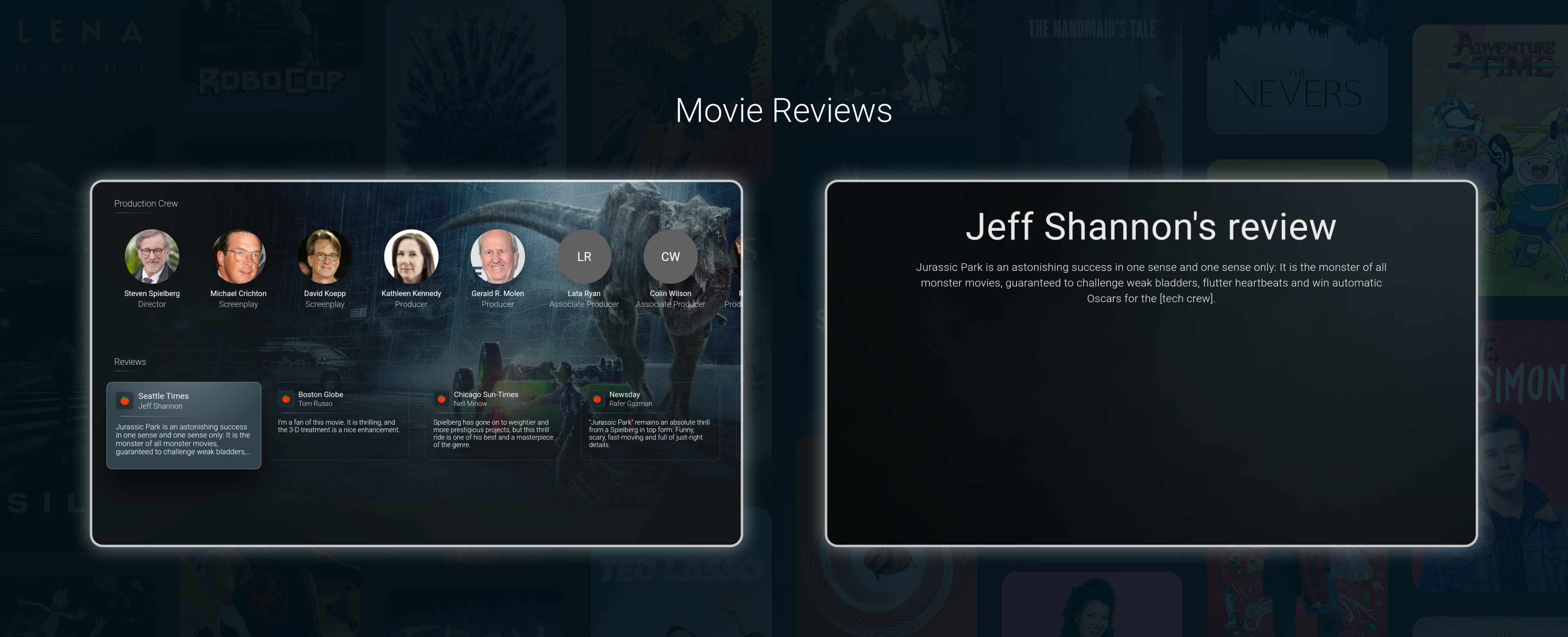
Dispatch will now display reviews on the movie details page.

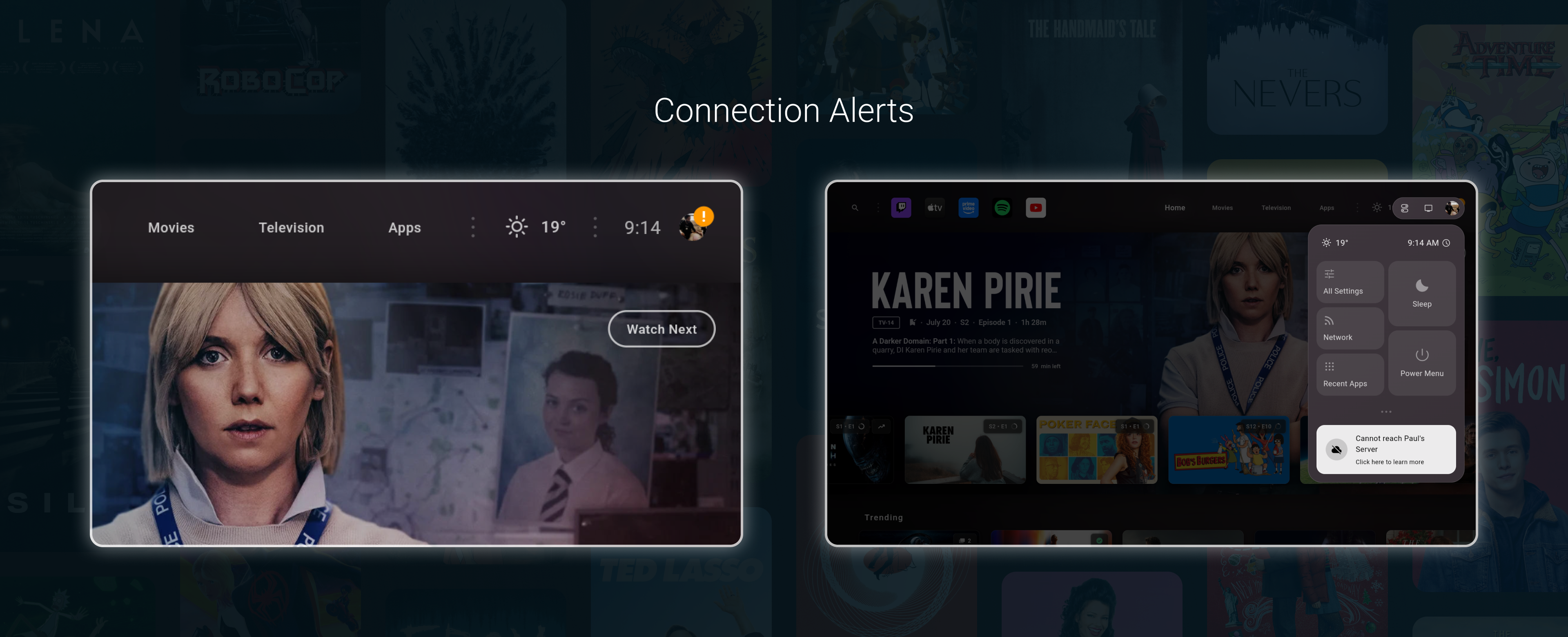
Dispatch will now display a warning when it can't reach your Plex server. Selecting this notification will attempt to automatically resolve the problem if it can, and if not, it will prompt the user with some further diagnostic steps.
One potential scenario where this comes into play is when a user's Plex authentication session expires. Normally, your Plex authentication token should not expire, however, under certain circumstances it can occasionally happen.
From the user's perspective, while using Dispatch, this would result in Dispatch "no longer syncing". With these changes, Dispatch will now alert the user that the connection is failing, and upon selecting the notification they would be asked to re-sign in to Plex so that syncing can resume.

Users can also manually re-authenticate their Plex account from Settings -> Profiles & Connections -> Manage Connections
Work on multiple profiles / profile switching continues. It's progressing well and will hopefully be available shortly enough.
August 21st, 2025
New
Hi everyone! This is update was actually submitted on Sunday but is still being reviewed by Google. Since it's taking longer than usual, I'm making this post now to let folks know what's pending in this release.
This update has now been completely rolled out
The latest version of the Plex API has made changes to their watchlist endpoints. This update addresses those changes, fixing any broken watchlist functionality in Dispatch.
The watchlist fix has also been pushed to the stable branch, and will be available at the same time as this release.
Dispatch will now display reviews on the movie details page.

Dispatch will now display a warning when it can't reach your Plex server. Selecting this notification will attempt to automatically resolve the problem if it can, and if not, it will prompt the user with some further diagnostic steps.
One potential scenario where this comes into play is when a user's Plex authentication session expires. Normally, your Plex authentication token should not expire, however, under certain circumstances it can occasionally happen.
From the user's perspective, while using Dispatch, this would result in Dispatch "no longer syncing". With these changes, Dispatch will now alert the user that the connection is failing, and upon selecting the notification they would be asked to re-sign in to Plex so that syncing can resume.

Various fixes and optimizations have been made regarding the media browsing features introduced in the last release.
I still have a few bug fixes that need to be made over the next week or so. After those have been implemented, all features in the beta branch will make their way over to the stable branch.
Work on multiple profiles / profile switching continues. It's progressing well and will hopefully be available shortly enough.
July 24th, 2025
New
Hi everyone! This update is a large one, so there's a lot to cover. First though, while I originally intended for the next release to be for Profile Switching, I felt the need to re-prioritize the features in this release due to this unresolved issue with the Plex app
This bug essentially makes it impossible to navigate to Plex's movie, show, or episode's detailed pages from Dispatch. As such, I've worked hard to replicate the features these pages normally provide within Dispatch directly. This was always something I planned to do eventually, so it was not a total detour, at least.
As this is a large update, some bugs or issues are expected. If you notice any, please let me know.
First, here's a walkthrough video of the features discussed in this post:
-
With this release, the "info" button/action now navigates to a detailed view of the selected media directly in Dispatch, rather than in Plex. In many places, you will now see actions such as "Open Movie" or "Browse TV Show" instead of the previously generic "info" button.

Users will see trailers, teasers, featurettes, and scenes from both Plex and YouTube, powered by TMDB. Note that in a future release, and before this update reaches the stable track, YouTube extras will become optional. For now, they are always shown.
The movie's cast and crew are also browsable from this page. Selecting a cast / crew member will display all Plex media for this person.

From the main buttons on the movie page, users can now navigate upwards to highlight the movie's plot. Clicking on this will display some more details for this item. Users can scroll up and down in this page using the directional buttons on their remote.

Users can also browse TV Shows. In addition to the cast and trailers found in the movie page, a TV show's seasons are also displayed here. When a season is selected, the episode browser is shown.

Users can browse all episodes in a season and select which one to play, same as in Plex. By pressing down while an episode is highlighted, the user will be presented with that episode's cast and crew. Cast and crew for episodes are loaded once an episode is highlighted. Once the down arrow appears under the episode thumbnail, the cast is available for browsing.

These two buttons are now available from the home page when viewing a TV Episode or Season, giving a convenient way to navigate through your shows. These are also available from the context menu by long clicking an item.

Users can now browse their collections as well. If a collection is missing a background image, a composite image is generated using random posters from the collection.
In addition, users can use the "Select Something Random" button to randomly bring up the detailed view for a random item in the collection. This can be a fun way of picking out a movie or show from a large collection.
As this was a large and unplanned update, I'll be taking a small break before returning to Profile Switching, which I hope will be ready soon enough. Furthermore, there are a few final touches to the features outlined in this post that I'll be wrapping up as well (Which may come in the form of smaller updates in the next little while or perhaps will ship with the Profile Switching release.)
That's it for now. This update has been released to the beta track first. If testing goes well, it will be rolled out to the stable track as soon as possible.
Users who would like to join the beta track can do so here:
Sign up from an android device
Thanks!
February 7th, 2025
New
This is a minor update with some changes being tested on the beta track
This setting allows users to change the default action when a media item is opened in Dispatch. There are two options: Go to info page and Start Playback immediately.
These options are found in Settings -> Experience -> Playback Options
Go to info pageWhen this option is used, selecting a media item from the movies, televeision, or search pages will open the selected item's info page in Plex. This has not changed from previous versions, however, with this update the ethos is applied to the home page as well. When enabled, the info button will be hidden from media items on the home page and the Play/Resume button will always go to the info page in Plex.
This option is useful for users who encounter a bug where starting playback directly from Dispatch stops Plex from recording / updating the user's playback progress. Unfortunately, this is a bug within the Plex app that has existed for years and also exists when using the default Android TV launcher.
Start Playback ImmediatelyWhen this option is used, selecting a media item from the movies, televeision, or search pages will start playback in Plex immediately. On the home tab, the info button will be shown and the Play/Resume button will always start playback immediately in Plex.
In earlier versions of Dispatch, some users reported some playback lag while using Dispatch. In order to make sure user's media playback experience was never impacted, a feature was introduced to automatically shut-down Dispatch while media is being played.
However, with all the recent optimizations, it's likely this feature is no longer required. As such, for the next while, releases on the beta track will have this feature disabled by default. If testers on the beta track don't report any regressions to their playback experience, this will eventually be rolled into the stable track.
The feature will remain optional, however, and can be turned back on from Settings -> Experience -> Playback Options.
Note, however, that on devices with lower amounts of RAM, it's likely that the Android OS will close Dispatch during playback anyway. Higher RAM devices, however, will notice that pressing the home button will re-open Dispatch much more quickly if it wasn't previously closed by the above option or by the Android OS.
The following has been fixed:
Fixes an issue causing Plex login errors in certain regions (this fix is also available on the stable track)
Fixes an issue causing duplicate watch next items for non-Plex media
Fixes an issue causing certain images to load more slowly than they needed to
Fixes an issue where occasionally the media fanart and wallpaper did not load correctly on start up
Users who want to join or leave the beta track can do so from here:
January 26th, 2025
New
With this update, enhancements that have been tested in the beta track over the last two months are making their way to the stable track. This update is being rolled out in stages to all users as I monitor for any potential issues.
Aside from the first change outlined below (Advanced Auto-Start Mode), all other changes listed in this post have already been communicated by the January 15th and December 24th changelog entries.
When users opt to enable Auto-Start in Dispatch, they will now be presented with two options:
Simple Mode

Simple Auto-Start ModeThis auto start mode is the same as what was previously available in Dispatch. It uses an Android Accessibility service in order to set Dispatch as the default launcher on your device. Unfortunately, all Accessibility Services on Android incur a fairly significant performance cost. Users who want to maximize performance on their device should consider using the Advanced Auto-Start Mode instead.
Note: If you are using any other accessibility service, such as a button remapper, your device will still take the same performance hit due to the accessibility service involved.
Advanced Auto-Start ModeThis auto-start mode uses the help of the ADB TV app from Google Play in order to set Dispatch as the default launcher. When selecting this mode, users will be shown a guide on exactly which steps need to be taken in order to use this mode. Since this mode forgoes using an Android Accessibility Service, UI performance is significantly better than the Simple Auto-Start Mode.
Note: if you already use ADB from your PC to disable the default launcher entirely, the advanced mode achieves the same result.
Each mode has their pros and cons, which are listed in the mode selector and screenshots above.
With this update, all trials have been reset once again. Anyone who has previously tried Dispatch will be able to do so again with a refreshed 14-day trial.Please keep in mind that the update is being rolled out in stages, meaning you will need to wait until the update is available to you before taking advantage of the trial reset.
From this point forward, all changes listed are repeats from the last two changelog entries
The specific updates that affect performance are too numerous to list, as there are hundreds, but with this update, users should see improved UI performance across the board.
A huge number of changes and optimizations have also been made in order to speed up how fast Dispatch syncs your media. For instance, some operations, which used to be applied to every item in your home feed, have been sped up by ~15,000x
The sum result is that Dispatch will sync with your libraries much more quickly than before. This not only results in quicker syncs, but also better all around app performance, as Dispatch needs to spend far less time processing your media than before.
The clearest example would be Dispatch's initial post-installation sync:Before this update: ~30 minutesWith this update: ~2 minutes
When a custom wallpaper has been set, Dispatch will now theme the rest of the app accordingly.


Users can now also configure where the wallpaper is shown. For example, in the following screenshots, the user has opted to show the wallpaper on the Navigation Menu as well as on the Media Libraries pages.

The following options are available:
Navigation Menu
Favorite Apps & Search Button
Apps Library
Media Libraries
Home Feed
Additionally, the user wallpaper will now show in the Wallpaper Settings page, allowing users to preview changes to the wallpaper and the wallpaper's brightness. Options have also been added here to control which pages the wallpaper is shown on, as explained above.

Dispatch can now optionally display watched indicators in the top right corner of your media items.

Additionally, Dispatch can now display indicators detailing unwatched episode counts, playback progress, how many episodes are in a season release, as well as whether a particular item is trending

These options are turned on by default and can be turned off from Settings -> Experience.
Users can now manually activate their screensaver by pressing the back button while the home tab is highlighted. This behavior is on by default, and can be disabled from Settings → Experience. This feature is not available on devices running Android 14 and above.
When browsing the home feed, users can now long press the back button to activate the Home Directory no matter where they are. Previously, the Home Directory could only be activated by pressing the left direction button while the user is highlighting the first item in a row.
As a reminder, the Home Directory is a simplified view of your home feed that is more similar to other launchers and the stock Android / Google TV launcher. It's a great way to quickly see more content on your home screen or zoom out of Dispatch's large artwork focused UI.

These last few updates put a close to a set of **very large **efforts aimed at improving Dispatch's performance across many metrics. And while I have noticed some lamenting the fact that new features aren't been added as quickly as they'd like, I felt it was important to improve upon these issues as best as I could first. I believe as a result, Dispatch is on a much more solid foundation than at the time of release. I will of course always keep an eye out for any other potential improvements that can be made in these realms.
Otherwise, the roadmap hasn't changed and work continues on the following features, which I will have more to say about when they are ready.
User Profiles / Profile Switching
Multi-Server support for Plex
Version / Quality selector when opening Plex media
Support for Android / Google TV notifications, including Now Playing and Casted Media notifications.
Translate Dispatch into other languages (If you'd like to help translate Dispatch, please leave a comment here)
Continue investigations into the possibility of integrating with Stremio, as it is by far the most popular feature request.
January 15th, 2025
New
This update is largely aimed at improving the speed with which Dispatch syncs your media. Like the previous update, the changes under the hood are quite sweeping, even if there are few visual changes.
A huge number of changes and optimizations have been made in order to speed up how fast Dispatch syncs. For instance, some operations, which used to be applied to every item in your home feed, have been sped up by ~15,000 times.
The sum result is that Dispatch will sync with your libraries much more quickly than before. This not only results in quicker syncs, but also better all around app performance, as Dispatch needs to spend far less time processing your media than before.
The clearest example would be Dispatch's initial post-installation sync:Before this update: ~30 minutesWith this update: ~2 minutes
Dispatch can now optionally display watched indicators in the top right corner of your media items.

Additionally, Dispatch can now display indicators detailing unwatched episode counts, playback progress, how many episodes are in a season release, as well as whether a particular item is trending

These options are turned on by default and can be turned off from Settings -> Experience.
For those in the beta track who have noticed this error while updating to the previous version, this update also aims to address this issue. If you update and notice this error again, please consider doing the following:
From the unknown error screen, enable logging.
Quit Dispatch and re-open it.
Let the app sit for a few minutes, then export your logs and send them to me directly. You can DM me directly from the subreddit, or email me at dispatchtvdev@gmail.com
These last two updates put a close to two **very large **efforts aimed at improving Dispatch's performance across many metrics. And while I have noticed some lamenting the fact that new features aren't been added as quickly as they'd like, I felt it was important to improve upon these issues as best as I could first. I believe as a result, Dispatch is on a much more solid foundation than at the time of release. I will of course always keep an eye out for any other potential improvements that can be made in these realms.
Otherwise, the roadmap hasn't changed and work continues on the following features, which I will have more to say about when they are ready.
User Profiles / Profile Switching
Multi-Server support for Plex
Version / Quality selector when opening Plex media
Support for Android / Google TV notifications, including Now Playing and Casted Media notifications.
Translate Dispatch into other languages (If you'd like to help translate Dispatch, please leave a comment here)
Continue investigations into the possibility of integrating with Stremio, as it is by far the most popular feature request.
December 24th, 2024
New
Hi everyone! The bulk of this update are optimizations aimed at improving app performance. In addition, a couple of minor new features and bug fixes have been included as well.
This update is being released to Dispatch's beta track first. If no major issues are uncovered, the release will later be rolled out to the stable track.
The specific updates that affect performance are too numerous to list, as there are hundreds, but with this update, users should see improved app performance across the board. In terms of changes to the app's code, the performance improvements take up roughly 95% of the code changes in this update.
When a custom wallpaper has been set, Dispatch will now theme the rest of the app accordingly.


Users can now also configure where the wallpaper is shown. For example, in the following screenshots, the user has opted to show the wallpaper on the Navigation Menu as well as on the Media Libraries pages.

The following options are available:
Navigation Menu
Favorite Apps & Search Button
Apps Library
Media Libraries
Home Feed
Additionally, the user wallpaper will now show in the Wallpaper Settings page, allowing users to preview changes to the wallpaper and the wallpaper's brightness. Options have also been added here to control which pages the wallpaper is shown on, as explained above.

Users can now manually activate their screensaver by pressing the back button while the home tab is highlighted. This behavior is on by default, and can be disabled from Settings → Experience. This feature is not available on devices running Android 14 and above.
When browsing the home feed, users can now long press the back button to activate the Home Directory no matter where they are. Previously, the Home Directory could only be activated by pressing the left direction button while the user is highlighting the first item in a row.
As a reminder, the Home Directory is a simplified view of your home feed that is more similar to other launchers and the stock Android / Google TV launcher. It's a great way to quickly see more content on your home screen or zoom out of Dispatch's large artwork focused UI.

The following fixes are included in this release
Fixes an issue causing Plex watchlists to fail to sync.
Fixes an issue where scrolling up in certain settings pages would cause the app to lose focus and become unresponsive.
The roadmap has not changed. Work continues on the following features, which I will have more to say about when they are ready.
User Profiles / Profile Switching
Multi-Server support for Plex
Version / Quality selector when opening Plex media
Support for Android / Google TV notifications, including Now Playing and Casted Media notifications.
Translate Dispatch into other languages (If you'd like to help translate Dispatch, please leave a comment here)
Continue investigations into the possibility of integrating with Stremio, as it is by far the most popular feature request.
Please note: While features selected for the roadmap are always my main focus, users can still expect other updates to be released here and there addressing smaller issues or features while those larger projects continue to be worked on.
October 23rd, 2024
New
Hi everyone!
With today's update, and many others over the past two months, the launcher has finally reached a level of stability that I'm happy with.
In addition, the trial has moved to a cumulative model, meaning only consecutive days of use are counted. So if you try Dispatch today, and don't feel like it's right for you yet, you can always try it again later and the trial will continue where you left off.
Summary of issues resolved since the initial release:
Fixes Dispatch getting stuck in a "Generating Metadata" phase
Fixes errors when connecting certain Plex accounts
Fixes errors when syncing with certain Plex libraries
Fixes errors when using Google login
Fixes an issue which caused a "Beta Expired" screen to appear and block further use of Dispatch
Fixes occasional lag occurring while playing or streaming media in other apps
Fixes crashes for some users while generating metadata or syncing Android TV app recommendations
Fixes errors when syncing Android TV app recommendations (from apps like Netflix, Apple TV, etc…)
Fixes wrong ordering of trending media
Restores the ability to long press the home button to bring up the Google TV Dashboard
Fixes an issue stopping the image cache from being trimmed, resulting in an unnecessarily large app cache.
Fixes an issue where app icons stopped displaying
Fixes an issue where newly installed app would not display until Dispatch was restarted
Fixes an issue where the input / keyboard was unresponsive while logging in via email + password
Fixes an issue where the Google TV account picker was inaccessible, stopping users from logging into their YouTube accounts, for example.
Fixes UI scaling on devices with non-traditional display sizes / densities, such as certain zidoo boxes or projectors.
Many other more minor issues
The following features have been selected for development next:
User Profiles / Profile Switching
Multi-Server support for Plex
Version / Quality selector when opening Plex media
Support for Android / Google TV notifications, including Now Playing and Casted Media notifications.
Translate Dispatch into other languages (If you'd like to help translate Dispatch, please leave a comment here)
I will also continue investigations into the possibility of integrating with Stremio, as it is by far the most popular feature request.